
Any Hosting Email Service with FluentSMTP
Use Other SMTP when the service is not in the provider grid, or when you only have a mailbox on the host (cPanel, Plesk, Zoho over SMTP, and similar).
WordPress mail() goes through PHP. Many hosts disable it. Cloud VMs almost always do. SMTP with a real mailbox or a transactional SMTP endpoint is the fix when you do not have an API in the list.
If the provider has a native tile (SES, Mailgun, Gmail, …), use that instead. API connections are more reliable than SMTP.
What you need from the host
| Field | Typical value |
|---|---|
| SMTP Host | mail.example.com or smtp.example.com |
| Port | 465 (SSL) or 587 (TLS). Sometimes 25. |
| Encryption | SSL with 465, TLS with 587 or 25 |
| Username | usually the full email address |
| Password | the mailbox password, or an app password if the host uses 2FA |
cPanel SMTP credentials if that is your panel.
Add the connection
Settings → FluentSMTP → Add Connection (or the first-run wizard). Pick Other SMTP.
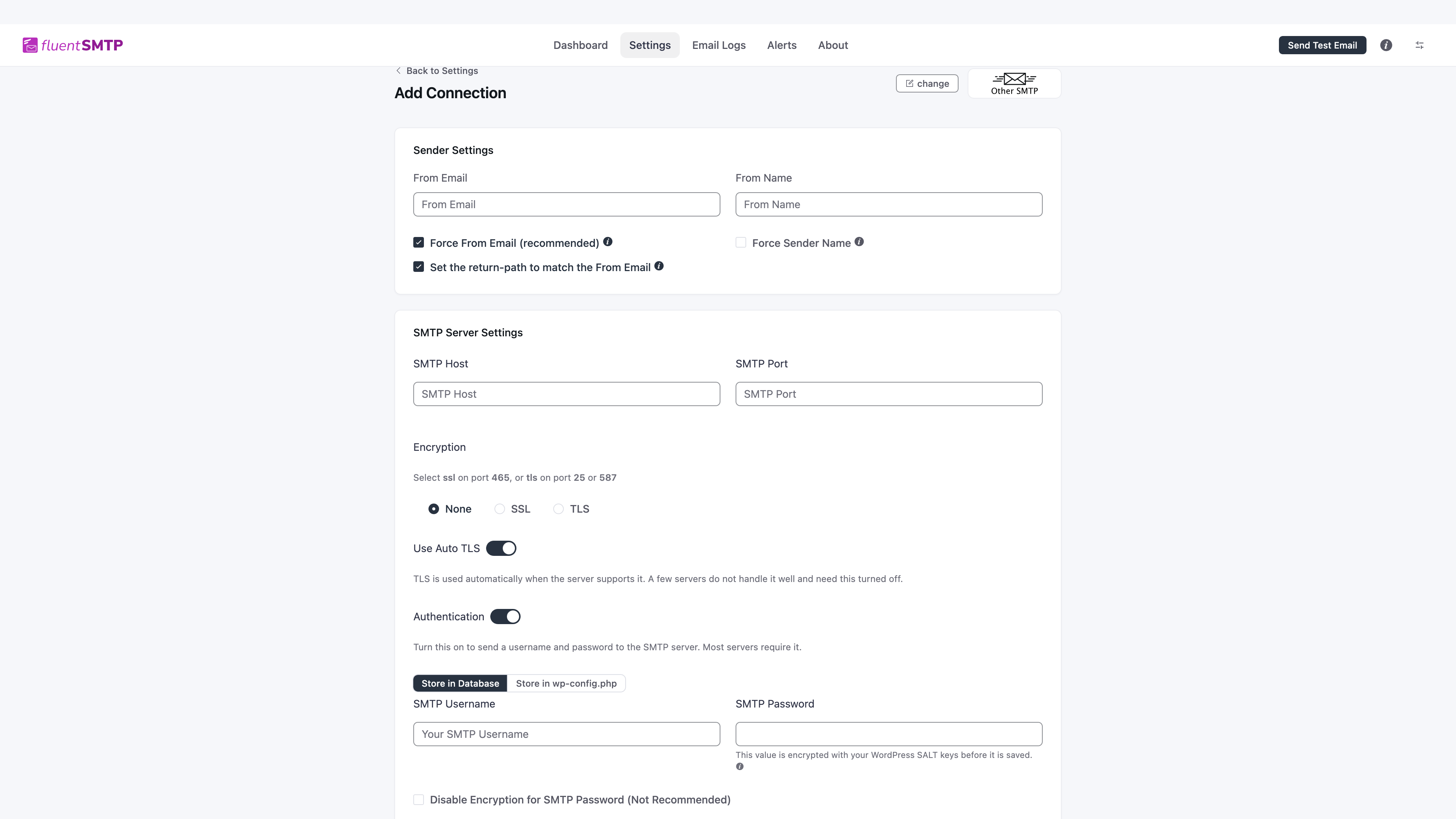
Sender Settings
- From Email: the mailbox you are sending as.
- From Name.
- Force From Email (recommended) unless another connection should keep its own From.
- Set the return-path to match the From Email.
- Force Sender Name if you want this name on every message this connection sends.
SMTP Server Settings
- SMTP Host and SMTP Port.
- Encryption: SSL on 465, or TLS on 25/587. The form repeats that.
- Use Auto TLS: leave on unless the server fails STARTTLS and you have been told to turn it off.
- Authentication: on, unless the host said the relay is IP-auth only (rare on shared hosting).
- Username and password.
- Leave Store in Database selected. You can tick Disable Encryption, or switch to Store in wp-config.php. Both are optional. See Where secrets are stored.
Click Save Connection Settings. FluentSMTP tries the server. If it cannot connect, it says so on the form. Then send a test.
Common failures
- Connection timed out: host or port blocked. Many hosts block outbound 25. Use 587 or 465.
- Authentication failed: wrong password, or the host wants an app password.
- Could not connect to SSL: encryption does not match the port.
- Mail arrives as spam: this mailbox has no SPF/DKIM for the domain. Ask the host to publish them, or move to a transactional API.