


What Is SMTP Relay? When to Use It and When to Avoid It

“Relay” has a bad reputation in email circles!
Mention it, and some people immediately think of spam, blacklists, or a wide-open server that hackers love to abuse. And honestly, that reputation isn’t entirely wrong!
But it’s incomplete!
Relay is simply how email moves from one server to another. Every email you have ever sent has been relayed by at least one server, and often several, before it reached the recipient’s inbox.
The real question is not whether relay is happening. It is whether relay is happening the right way.
And this article goes deeper into SMTP relay: what it is, why it matters, and when it becomes risky.
What Is SMTP Relay?
SMTP relay is the process of a mail server accepting an email that is not meant for itself and forwarding it toward the right destination. Sometimes, that message reaches the recipient’s mail server directly. Other times, it passes through a few servers along the way.
Think of it like a package moving through shipping hubs. One truck does not usually carry the package from your door to the recipient’s door. It moves from one hub to another until it reaches the final destination. Email relay works the same way!
If you have read our guide on how SMTP works, this part may already sound familiar. SMTP relay is the step where an accepted and authenticated message starts moving from one mail server to another.
When You Should Use SMTP Relay
First of all, most people use SMTP relay without realizing it, because it is already built into the tools they rely on!
When you connect WordPress to an email service provider like SendGrid, Mailgun, Postmark, or Brevo, you are using that provider’s servers as a relay. Your site hands off the message, and their infrastructure takes care of the rest.
And that is the most common and reliable form of relay for WordPress sites. It is also the main reason these services exist!
Why?
Because relaying through a reputable provider gives your WordPress emails a much better sending path instead of forcing them to depend on your hosting server’s reputation. And you should definitely use SMTP relay if you are:
Sending at meaningful volume
A single small server sending a handful of emails a day can usually manage on its own. Once you’re sending hundreds or thousands of transactional or marketing emails, a dedicated relay service handles the reputation management, retry logic, and deliverability monitoring that a basic server setup can’t.
Needing a better sending reputation than your own server has
Shared hosting IPs get a mixed reputation because they’re shared by hundreds of other sites, some of which may have been flagged for spam in the past. Relaying through a reputable provider lets you borrow their clean reputation instead of fighting an uphill battle with your host’s.
Direct sending means your own server contacts the recipient’s mail server without an intermediary. It can work, technically. But it also means every email depends entirely on your server’s reputation, configuration, and uptime. SMTP relay moves that responsibility to infrastructure that is actually built for email delivery.
When SMTP Relay Becomes a Problem
SMTP relay itself is not the risk. The real problem starts when relay is misconfigured, unauthenticated, or handled by a provider that does not protect its sending reputation properly.
Open relay
Open relay is the mistake that gets servers blacklisted. An open relay is a mail server that forwards emails from anyone without checking whether the sender is allowed to use it.
Spammers actively look for these servers because they can use them to send large volumes of spam through someone else’s infrastructure. And when that happens, the damage falls on the server owner.
If your server gets flagged as an open relay, mailbox providers can blacklist it. That means even your legitimate emails may start getting rejected or filtered into spam.
This is why relay should always be limited to authenticated senders only. Your SMTP authentication setup is what keeps random people from using your mail server as their own spam engine.
Learn more about SMTP authentication and why it matters
Relaying through an untrusted provider
Not every SMTP relay provider manages its sender reputation carefully. Some providers are strict about spam, abuse, bounce rates, and suspicious sending behavior. Others are not.
If a provider allows bad senders to keep using its infrastructure, the provider’s reputation can suffer. And if your emails go out through that same infrastructure, your deliverability can suffer too.
That is why choosing an SMTP provider should not only come down to price or features. You also need to consider how seriously the provider protects its sending reputation.
Relaying without encryption
Relay should also happen over an encrypted connection. If the connection is not encrypted, the contents of your email can be exposed while moving between servers. In some cases, sensitive information inside the message or connection can be at risk.
Modern SMTP relay should use secure ports and encryption so messages are not passed around in plain text.
What Happens When Your Relay Provider Goes Down?
Even a reliable relay provider has occasional outages, rate limits, or account issues. If that’s your only path out, every email your site tries to send during that window fails silently.
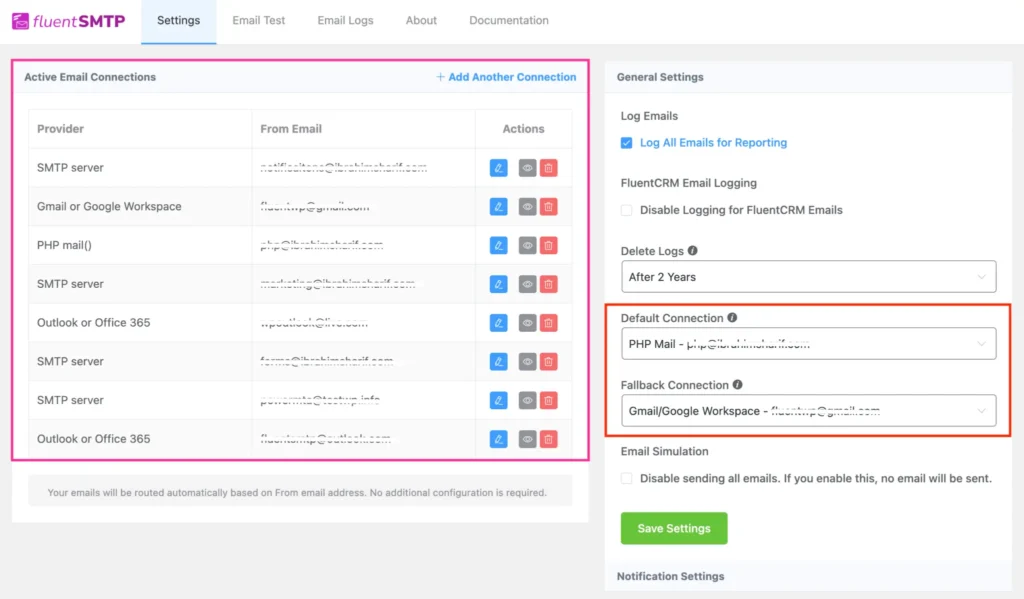
FluentSMTP handles this with fallback connections. You can configure a second relay provider, and if your primary connection fails to send a message, FluentSMTP automatically retries it through the fallback instead of just dropping it.
You can also route different types of email through different relays entirely, sending transactional emails through one provider and marketing emails through another, all from the same WordPress install.
Here’s how to set up a fallback connection in FluentSMTP
Where WordPress Fits Into This
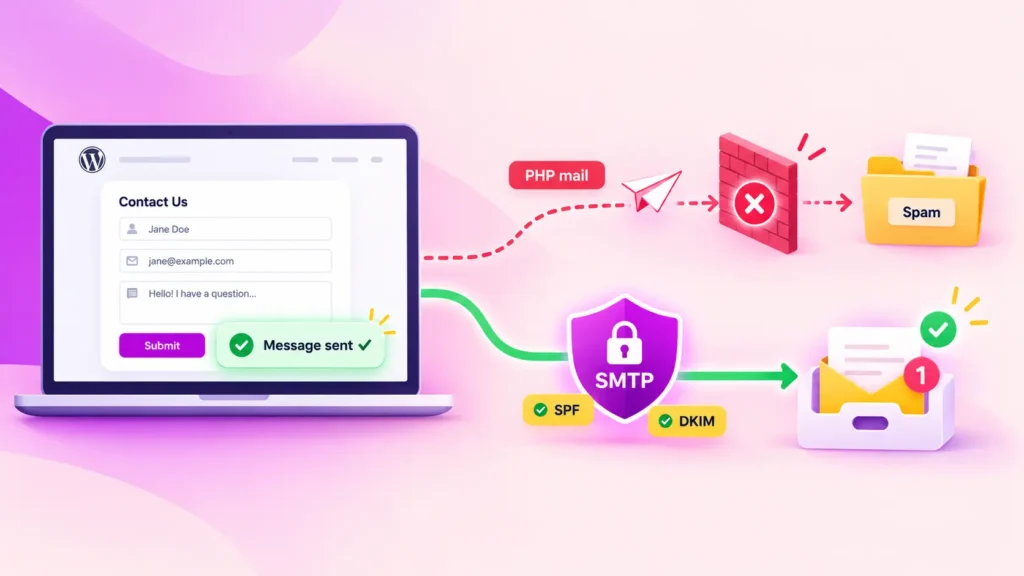
By default, WordPress doesn’t relay through anything reliable. It hands email to PHP’s mail() function, which typically tries to send directly from your hosting server, the least reputable sending path available, with no relay and no authentication behind it.
SMTP plugin like FluentSMTP changes this by routing your WordPress email through a real, authenticated relay: a provider like Amazon SES, Google Workspace, or Brevo. Instead of your shared hosting IP trying to convince inbox providers to trust it, your email travels through infrastructure that’s already earned that trust.

All for Free, Forever!
Take advantage of all the features, SMTP integrations and capabilities, without paying a dime. Get started now!
Frequently Asked Questions
Is SMTP relay the same as an open relay?
No, and this is a common point of confusion. SMTP relay is a normal, necessary function that every email provider uses. An open relay is a specific misconfiguration, a relay server that accepts messages from anyone without verifying permission. Relay is the mechanism. Open relay is the mistake.
Do I need a separate SMTP relay service for WordPress?
You need some form of authenticated relay, but it doesn’t have to be a dedicated “relay service” as a separate product. Most email service providers, including Amazon SES, SendGrid, and Brevo, function as your relay the moment you connect them through a plugin like FluentSMTP.
What’s the difference between SMTP relay and direct sending?
Direct sending means your own server contacts the recipient’s server with nothing in between. Relay means an intermediary server, typically one with a stronger sending reputation, forwards the message on your behalf. For most WordPress sites, relay produces far more reliable delivery than sending directly from hosting infrastructure.
Route Your WordPress Emails Through a Trusted Relay
SMTP relay is not something to avoid. It is something to set up correctly.
A message sent directly from an unproven hosting server starts with a disadvantage. The same message relayed through a trusted, authenticated provider gets a much better chance of reaching the inbox.
That is exactly what FluentSMTP helps you do. It connects your WordPress site to a reliable SMTP provider in minutes, so your emails are not left depending on the default WordPress mail setup.
If your emails have been inconsistent, delayed, or landing in spam, routing them through a trusted relay is one of the smartest places to start.
That’s all for today. Thank You.
Nader Chowdhury
Table of Content
Subscribe To Get
WordPress Guides, Tips, and Tutorials



Add your first comment to this post