

MTA-STS and TLS-RPT: The Email Security Standards Most Senders Ignore

You have set up SPF, DKIM, and DMARC. Maybe even started reading the reports. So your email is fully protected now, right?
Well, not quite!
Two more standards are sitting at the edge of every email authentication conversation, and almost nobody talks about them honestly: MTA-STS and TLS-RPT.
According to URIports’ 2026 survey, fewer than 1 percent of the top one million domains publish an MTA-STS policy. In Canada, only 3.2 percent of domains have it. Even in the United States, where adoption is higher, transport-layer security is the weakest part of most email security setups!
Now here is the part most blogs will not tell you: most small senders do not urgently need these.
SPF, DKIM, and DMARC stop spoofing of your domain. MTA-STS and TLS-RPT do something completely different. They protect the encryption of emails already in transit between mail servers.
This guide will explain what these standards actually do, the attack they were built to stop, who genuinely needs them, and how to roll them out without breaking anything.
The Attack MTA-STS and TLS-RPT Were Built to Stop
Before you can decide if you need MTA-STS, you need to see what it actually defends against. So let’s walk through what happens when an email moves from one server to another.
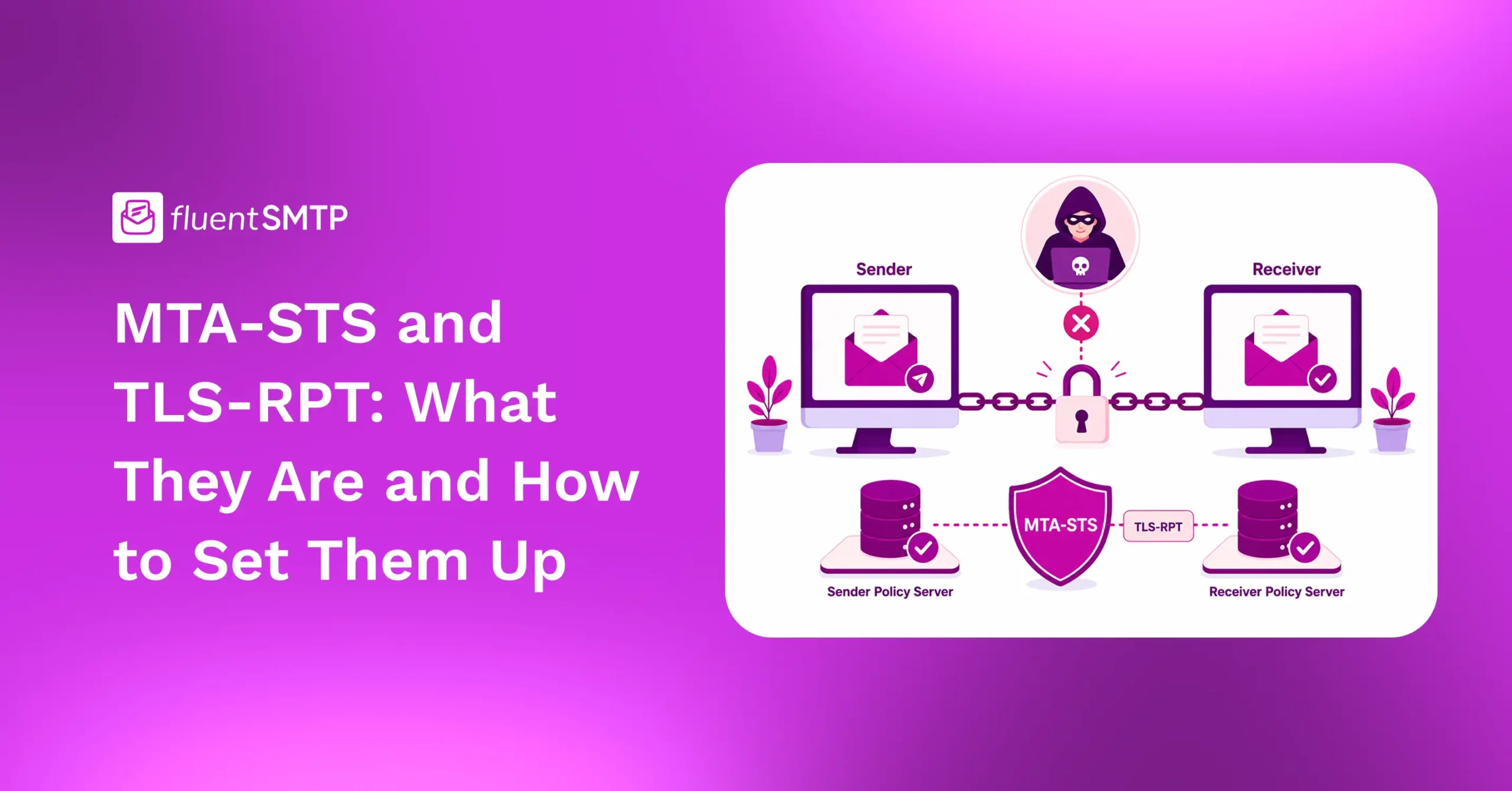
Imagine your customer sends an email to ‘[email protected]’. Their mail server connects to yours and starts a conversation. That conversation begins in plain text. Both servers introduce themselves, and yours says, “I support encryption. Let’s switch to a secure connection.” The sending server agrees, the connection becomes encrypted, and the message is delivered safely.
That is the happy path.
Now imagine an attacker sitting on the network between those two servers. Maybe at a hotel WiFi router. Maybe inside a compromised ISP. Maybe on a public cloud network.
The attacker watches the conversation happen.
When your server announces that it supports encryption, the attacker quietly removes that part of the message before it reaches the sender. The sending server now thinks your server cannot do encryption. So it falls back to plain text and sends the email anyway.
The attacker reads the entire email. Or modifies it. Or saves it for later.
This is called a TLS downgrade attack. And the worst part is that it works because the original SMTP standard was designed with optional encryption. Plain-text fallback is built in, not a bug.
MTA-STS closes this gap by changing the rule. Instead of “use encryption if you can,” it says “use encryption or do not deliver.”
That is the entire point.
What is MTA-STS?
MTA-STS stands for Mail Transfer Agent Strict Transport Security. It is an internet standard (RFC 8461) that lets your domain publish one strict rule:
“Any mail server delivering email to me must use a secure TLS connection. If TLS fails, do not deliver the message at all.”
Think of it as HTTPS, but for the conversation between mail servers. It does not affect what your inbox looks like or deliverability. It only ensures that emails arriving at your domain cannot be intercepted in transit.
What is TLS-RPT?
TLS-RPT stands for SMTP TLS Reporting (RFC 8460). It is a reporting mechanism that tells you when sending servers fail to establish a TLS connection with your mail servers. It works almost identically to DMARC’s aggregate reporting (rua).
You publish a TXT record, and compliant sending servers package up information about any TLS issues they encountered and send you a daily report in JSON format. These reports tell you things like:
- Certificate problems (expired, mismatched, untrusted)
- STARTTLS negotiation failures
- The count of successful and failed delivery attempts
- The sending IPs involved
MTA-STS without TLS-RPT is like installing a security camera but never plugging it in. The protection might be working. You will simply have no way to know. So, always set them up together.
Do You Actually Need MTA-STS and TLS-RPT? (An Honest Take)
Here is where I am going to be more direct than most blogs. If you are running a small WordPress site that sends transactional emails, MTA-STS is not your next move. Your time is better spent getting DMARC into enforcement, cleaning up SPF, or fixing DKIM.
But MTA-STS becomes genuinely important if any of these apply to you:
- You receive sensitive emails at your domain: support tickets, customer documents, legal communications, anything containing personal data
- You work in a regulated industry: Banking, healthcare, government, legal, or education
- You handle high-value communications that could be a target for interception
- You already have DMARC at p=reject and want to harden the rest of your stack
- You manage email for a brand large enough that someone might actually attack it
If you do not fit any of these, that is fine. Bookmark this guide and come back when your authentication basics are solid.
If you do, keep reading.
How MTA-STS and TLS-RPT Fit into Email Authentication
Email authentication has layers. Each layer solves a different problem.
- SPF, DKIM, and DMARC verify who is allowed to send email from your domain. They answer the question: “Is this email really from who it claims to be?”
- MTA-STS and TLS-RPT verify how email is delivered to your domain. They answer: “Is the connection delivering this email actually secure?”
- BIMI sits on top for visual branding. It answers: “Can people visually recognize this is a trusted sender?”
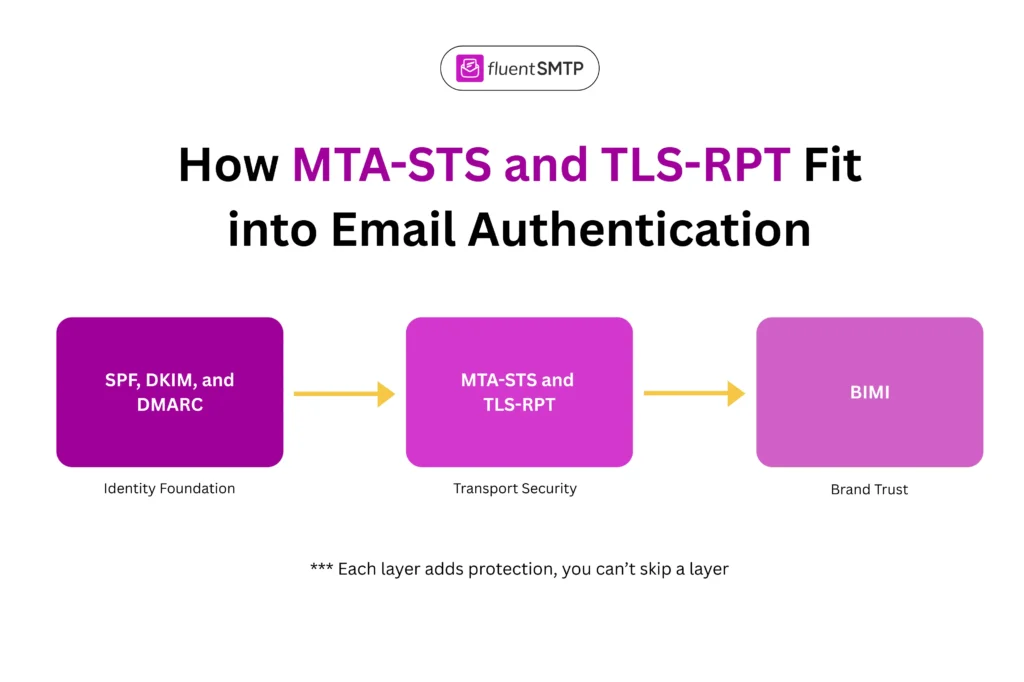
In simple terms: SPF, DKIM, and DMARC handle identity, MTA-STS and TLS-RPT handle transport, BIMI handles trust signals, and things actually work in this order:
- SPF
- DKIM
- DMARC
- MTA-STS
- TLS-RPT
- BIMI (optional, for branding)
You cannot skip a layer. You can only add layers in the right order.
Tip: If your foundation is shaky, MTA-STS will not save you. So, if SPF, DKIM, or DMARC are still inconsistent, fix them first.
How to Roll Out MTA-STS and TLS-RPT Without Breaking Mail
In practice, MTA-STS has more moving parts than DMARC, and one small mistake can block real emails. So instead of giving you a checklist, let me walk you through the actual deployment journey.
Phase 1: Pre-flight checks
Before you touch anything, confirm three things.
First, your MX servers must support TLS with valid certificates. Run a quick check at MXToolbox or CheckTLS. The certificate on each MX host must match the hostname, must not be expired, and must be signed by a publicly trusted authority.
Note: If you are using Google Workspace or Microsoft 365, this is already handled. If you run your own mail server, do not skip this step.
Second, you need a place to host a small text file at ‘https://mta-sts.yourdomain.com/.well-known/mta-sts.txt’. The hosting must support HTTPS with a valid certificate on the mta-sts subdomain. You can use your existing web host, Cloudflare Pages, Azure Static Web Apps, or a hosted MTA-STS service.
Third, you need a working mailbox to receive TLS-RPT reports. Either a regular inbox or a hosted parsing service.
If any of these are not in place, stop. Fix them first.
Phase 2: Deploy in testing mode
This is where you publish your policy without enforcing anything. The goal is to catch problems before they block real mail. Create the policy file with this content:
version: STSv1
mode: testing
mx: mail.yourdomain.com
max_age: 86400
Replace ‘mail.yourdomain.com’ with your actual MX hostname. If you have multiple MX hosts, add a line for each. The max_age of 86400 (one day) is intentionally short while testing.
Upload that file to the exact path mentioned earlier.
Next, add this TXT record to your DNS:
- Type: TXT
- Name: _mta-sts
- Value: v=STSv1; id=20260520T120000;
The ID is just a version stamp. Use today’s timestamp. You will change it every time you update the policy.
Now publish the TLS-RPT record so you can actually see what is happening:
- Type: TXT
- Name: _smtp._tls
- Value: v=TLSRPTv1; rua=mailto:[email protected]
You are now in testing mode. No mail is being blocked. But sending servers will start checking your TLS setup and reporting back.
Phase 3: Watch and wait
This is the boring part. And it is the most important part. Run testing mode for at least two to four weeks.
During this time, your TLS-RPT mailbox will start receiving daily reports from major mail providers like Google, Microsoft, and Yahoo. Read them. Look for any pattern of failure.
Common things you might see:
- A specific MX host is failing TLS validation
- Certificates are being rejected for hostname mismatch
- One mail provider is repeatedly unable to connect
If you see clean reports for two to four weeks straight, you are ready for the next phase. If you see issues, fix them and reset the clock.
A heads-up: do not expect a flood of reports. Smaller senders rarely send TLS-RPT yet. You’ll mostly hear from the big providers. That’s normal.
Phase 4: Switch to enforce
Once your reports look clean, update the policy file:
version: STSv1
mode: enforce
mx: mail.yourdomain.com
max_age: 604800
Two changes here. The mode is now enforced, which means sending servers will reject delivery if TLS fails. And max_age is now 604800 (one week), which is a more realistic cache time for stable production.
Then update the ID value in your DNS record to something new. This signals sending servers to refresh their cached policy.
You are now actively protected.
Phase 5: Validate and document
Before you walk away, confirm everything works.
Use a validator like Hardenize, MXToolbox, or the URIports MTA-STS checker. They will tell you if anything is broken.
Then document what you did. Future-you will thank you when something breaks six months from now.
Phase 6: Monitor everything closely
MTA-STS depends on TLS certificates. TLS certificates expire. Most are valid for 90 days (if you use Let’s Encrypt) or one year (if you use a commercial CA). If a certificate expires and your renewal automation fails, your MTA-STS policy will start blocking real mail.
So once your setup is live, build a habit. Check your TLS-RPT reports at least once a month. Set calendar reminders for certificate renewals. If you change mail providers, update your policy file and DNS record before the switch, not after. If you add a new MX host, update the policy first.
A quick monthly check is usually enough to keep things stable
What Can Go Wrong (and How to Tell)
MTA-STS failures usually happen at one of three stages. Knowing the stage tells you where to look.
- Failures during initial setup
The TXT record has a typo. The policy file is at the wrong path. The HTTPS certificate on the mta-sts subdomain is invalid. The file has the wrong line endings. If you cannot get validators to recognize your setup, the problem is here.
- Failures during testing mode
You will see specific certificates failing, specific senders timing out, specific MX hosts refusing TLS. These are real infrastructure issues that would have caused bounced mail if you had jumped straight to enforce. This is exactly what testing mode is for.
- Failures after switching to enforce
If mail starts bouncing after you move to enforce, something changed. A certificate expired. An MX record was updated without updating the policy. A new mail server was added that does not support TLS properly. The fix is usually to switch back to testing mode, identify the issue, and only return to enforce once it is solved.
The pattern to remember is simple. Pre-flight problems are about your setup. Testing problems are about your infrastructure. Enforcement problems mean something changed and you missed it.
MTA-STS & TLS-RPT Work Best as Part of a Complete Stack
MTA-STS and TLS-RPT are not magic.
- They will not improve your open rates
- They will not push you out of spam folders
- They will not undo a missing DMARC record
But if your email authentication foundation is solid, they close a real security gap that has existed in SMTP for decades. They protect a part of email delivery that most senders never even think about. And they give you visibility into things that are normally invisible.
The order is what matters.
Get SPF, DKIM, and DMARC right. Push DMARC to enforcement. Add BIMI if branding matters to you. Then add MTA-STS and TLS-RPT for transport security.
Follow this sequence, and your email stack is genuinely complete.
That’s all. Have a good day.
MTA-STS and TLS-RPT FAQs
Nader Chowdhury
Table of Content
Subscribe To Get
WordPress Guides, Tips, and Tutorials





Add your first comment to this post