

How to Monitor WordPress Email Sender Reputation (Fix Deliverability Issues)

Email sender reputation usually stays invisible. You don’t see it in your WordPress or email marketing dashboard until small problems start showing up.
Customer replies drop, Sales feel slightly “slower”. But nothing indicates any major problem right away.
Then it gets real: one customer asks if their order was confirmed, another says they never received your email. And since nothing really indicates something is wrong, you suddenly have to troubleshoot your entire email stack.
And trust me, it’s still hard to tell if your email sender reputation has dropped and if that’s what is causing the issue. The easier way is to simply monitor your email sender reputation and check it when things don’t add up.
Because at the end of the day, email sender reputation decides whether your WordPress emails reach the inbox or quietly disappear into spam. Want to learn how to monitor that reputation, what signals actually matter, and how to keep it from slipping?
Keep reading!
Why Monitor WordPress Email Sender Reputation?
The problem with email sender reputation is: nothing actually “breaks” when your email sender reputation drops.
Your emails still go out, automations run as they should, and your dashboard shows everything as “sent”.
All this should mean your email is fine, right?
But inbox providers like Gmail, Yahoo, and Outlook start treating your emails differently. Instead of placing them in the inbox, they move your emails to the spam folder or delay them.
That’s why email sender reputation is complicated. From your side, everything looks normal. But from your customer’s side, nothing shows up. Over time, the impact compounds.
- Fewer people see your emails
- Open rates drop
- Clicks slow down
- conversions fall
- future emails perform worse
For a WordPress site, this breaks core workflows.
- Transactional emails lose reliability
- User registration, order confirmation, password reset email, etc., don’t send
- Abandoned cart emails stop recovering revenue
- Onboarding emails fail to activate users
- Re-engagement campaigns quietly stop working
At this point, most people will try to fix the wrong things, like the email, plugin compatibility, and so on. But none of that fixes the real issue.
Because the problem isn’t what you’re sending, it’s whether inbox providers trust you enough to show it.
That’s why monitoring sender reputation matters. It gives you visibility into something that’s otherwise invisible, so you can spot issues early and fix them before your email system starts breaking.
What Exactly is Email Sender Reputation?
In simple words, Email sender reputation is the trust metric inbox providers assign to your domain. It’s based on how people interact with what you send. Even with a properly configured SMTP plugin, inbox placement still depends on these engagement signals.
If your subscribers open, click, and engage, your email sender reputation improves. If they ignore, delete, or mark emails as spam, your sender reputation takes a hit.
Email clients regularly track your emails and use these interaction signals to decide if your emails are worth placing in the primary inbox, promotional messages, or spam.
As a result, this affects all your WordPress and marketing emails. If your sender reputation is weak, inbox providers will limit your email visibility.
So, if reputation is based on trust, the next step is understanding what signals actually influence that trust.
Key Signals That Affect Your Sender Reputation
Email sender reputation isn’t something you fix once. It’s something you manage continuously.
And trust me, you don’t need a pile of dashboards for this. All you need are three things that tell you the truth quickly:
Trust Signals (Who You Are)
These signals define whether your domain and sending setup are considered reliable.
- Domain Reputation: Domain reputation is the trust signal attached to your sending domain (like yourstore.com). It usually builds over time based on how people react to all kinds of emails from your domain. If engagement is strong, your domain gains trust. If engagement drops or complaints increase, that trust fades. This is why choosing the right sending method and provider matters.
- IP Reputation: This is tied to the server or IP address sending your emails, and email clients treat it similarly to your domain reputation. Ideally, you want to have a dedicated server that shows good sending behavior long term.
Risk Signals (What Could Go Wrong)
These are negative signals that quickly reduce trust.
- Spam Complaints: When someone marks your email as spam, it sends a strong negative signal. This can happen for many reasons, such as too many emails, emails to inactive contacts, bad targeting, etc.
- Bounce Rate: Bounces indicate your email list quality. A high bounce rate tells inbox providers your list isn’t well-maintained, while a low bounce rate indicates an active email list. High bounce rates can also point to underlying sending or configuration issues.
Engagement Signals (How People React)
This is more important than the last ones. Every email client cares about how real people interact with your emails and what they do with your emails.
- Opens and Clicks: These show whether your emails are relevant and wanted. Consistent engagement improves reputation over time.
- Inactivity: If large portions of your list stop interacting, it signals declining relevance. Even if no one complains, low engagement still hurts your reputation.
You don’t need to overcomplicate this. If your engagement is strong, bounce rates are low, and you’re not getting any complaints, your sender reputation will stay healthy. But if those signals move in the wrong direction, your emails will slowly lose visibility.
Tools to Monitor Email Sender Reputation
Now that you know what signals matter, the next step is knowing where to actually monitor them.
- Google Postmaster Tools: If a large part of your audience uses Gmail, Google Postmaster Tools is the most important one. It shows your domain and IP reputation, spam complaint rates, and authentication status.
- MXToolbox: This one is useful for quickly checking if your domain or IP is blacklisted and whether there are any DNS or mail server issues. When something suddenly feels off, this is usually the fastest place to start.
- Sender Score: Sender Score has a simplified reputation score for your sending IP. It’s not a complete picture, but it helps you track whether your sending health is improving or getting worse over time.
- Spamhaus: This is another key blocklists to watch. If your domain or IP shows up here, it usually explains why emails are not reaching the inbox. In that case, the priority is to fix the issue before continuing to send.
These tools help you understand what’s happening after your emails leave WordPress, even when your SMTP logs show everything as “sent.”
In practice, you don’t need to monitor everything daily. Checking your domain reputation regularly, scanning for blacklist issues weekly, and keeping an eye on engagement trends is enough to catch most problems early.
How to Monitor Your Email Sender Reputation
Monitoring your email sender reputation doesn’t need to be complicated. You can easily set up a simple system that does the job for you.
Verify Your Domain in Monitoring Tools
If you cannot verify the domain, you’re guessing. And guessing is expensive when email is a revenue channel.
If you haven’t already, make sure your WordPress SMTP configuration is properly set up before monitoring reputation.
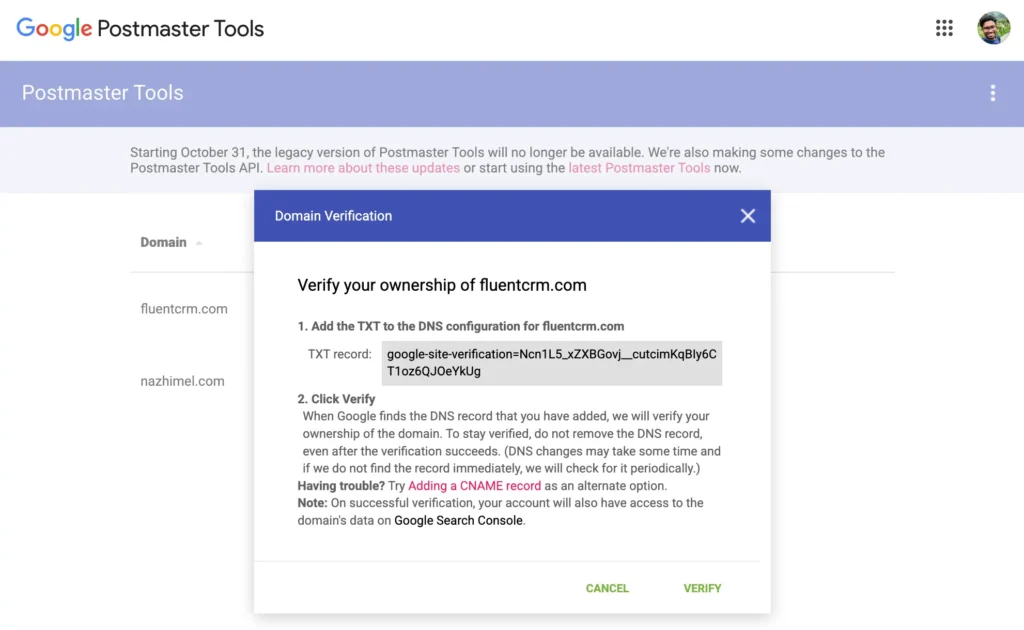
And to start off, verify your sending domain in Google Postmaster Tools and any other platform that gives you domain-level visibility. Google Postmaster Tools has an easy interface where you can set up monitoring simply by adding a TXT record to your DNS settings.
Check Blacklist Status Weekly
Set a weekly blacklist check for your domain and IP. You do not need to obsess over it every day, but what you need to know quickly is if something has changed. A weekly rhythm works because reputation issues tend to show up in patterns, not random magic.
Track Spam Complaints and Bounce Rates
This is the fastest way to spot list problems. If your complaints suddenly rise, your content or targeting is off. If your bounce rates increase, your list is poorly maintained. If both go the wrong way, stop sending the same way and check for issues immediately.
Monitor Engagement Trends
Look at trends over time, not one campaign in isolation. Ask if:
- Open Rates are dropping
- You’re getting clicks from a specific segment only
- Your new automation isn’t getting the average engagement metrics
- You have too many inactive subscribers, inflating your engagement rates
These engagement trends will help you optimize for better engagement, so you can not only keep your sender reputation intact but also improve your overall email marketing.
Set a Monthly Reputation Review
Once every month, do a deeper review. Check your domain and IP reputation, spam complaints, bounce trends, unsubscribe rates, engagement, etc.
When you treat monitoring as a routine instead of a reaction, sender reputation becomes something you manage, not something you chase when things break. And this way, you’ll do exactly that.
Common Reputation Issues and What They Mean
Most sender reputation problems don’t show up clearly. You don’t get a direct error, “this isn’t working ” message.
Instead, you will see patterns pointing to specific issues. And the fastest way to diagnose email sender reputation is to map these patterns to their likely causes.
- High Bounce Rate: A high bounce rate usually means poor list quality, bad imports, old contacts, or missing verification. In this case, keep your list clean, validate new signups, and upgrade segmentation.
- Low Opens: If your emails aren’t reaching the inbox, you may get low open rates. This happens when your contact list is cold, or subject lines aren’t engaging.
- Spam Complaints: If you’re getting this, you’re probably sending irrelevant or too many emails, or you haven’t got a good opt-in strategy.
- Massive Performance Drops: This is usually tied to a blacklisting issue. Immediately check your blacklist status, domain reputation, and authentication status. And if you’ve been sending too many emails, optimize your targeting.
How to Improve Your Sender Reputation
Monitoring only helps if it leads to better sending habits. Improving sender reputation usually comes down to fixing a few core issues and staying consistent.
- Clean List: A smaller, healthy list always outperforms a large, stale one. Remove invalid and inactive contacts to protect engagement
- Double opt-in: Only add verified subscribers who actually want your emails by employing double opt-in. This reduces fake signups, complaints, and long-term list decay
- Warm Up New Domains: If you are starting with a new domain, don’t blast your full list. Start with the most engaged contacts, build trust, and then increase volume.
- Control Frequency: Don’t over-email inactive subscribers. Lower frequency or move them into re-engagement flows to avoid hurting engagement
- Segment Your Audience: Send more to engaged users and less to inactive ones. Better targeting leads to stronger signals and higher trust
- Set Expectations: Clearly tell subscribers what they’ll receive and how often. Clear expectations reduce confusion and spam complaints
Keep Your List Healthy and Sender Reputation Intact with Automation
Monitoring sender reputation is one thing. Maintaining it consistently is where most setups break. That’s where automation comes in.
With an automation tool like FluentCRM, you can build simple workflows that protect your sender reputation in the background instead of reacting when things go wrong.
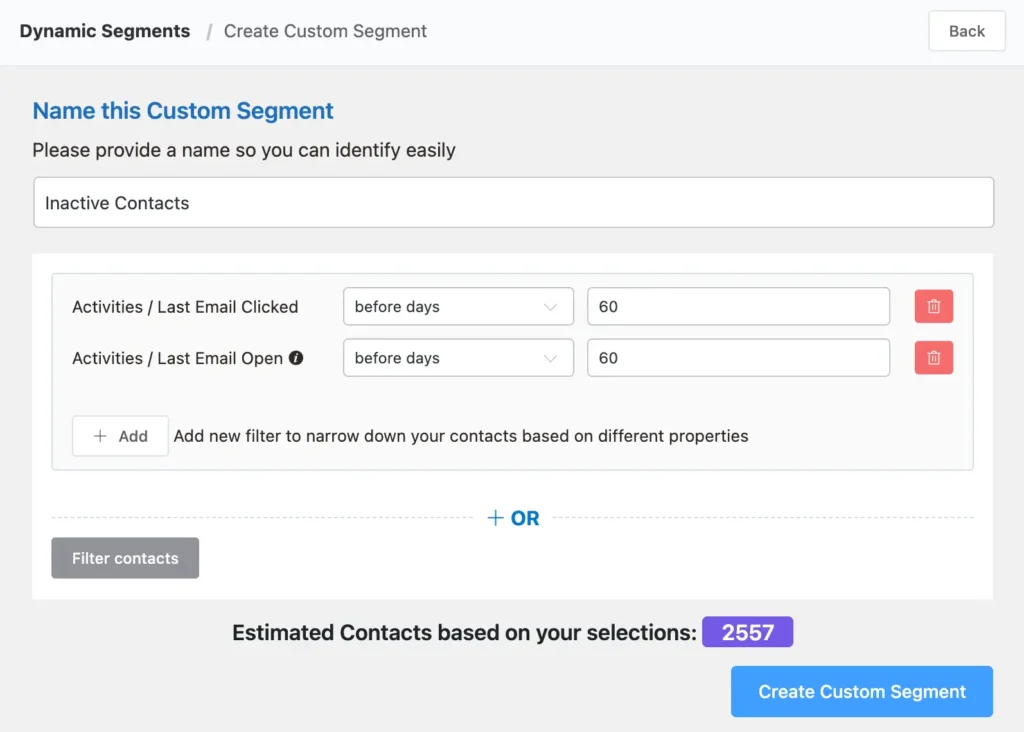
For example, here you can see an example segmentation to easily filter out your inactive contacts:
The best part?
You can create a dynamic segment which updates automatically based on your user behavior. No manual update needed!
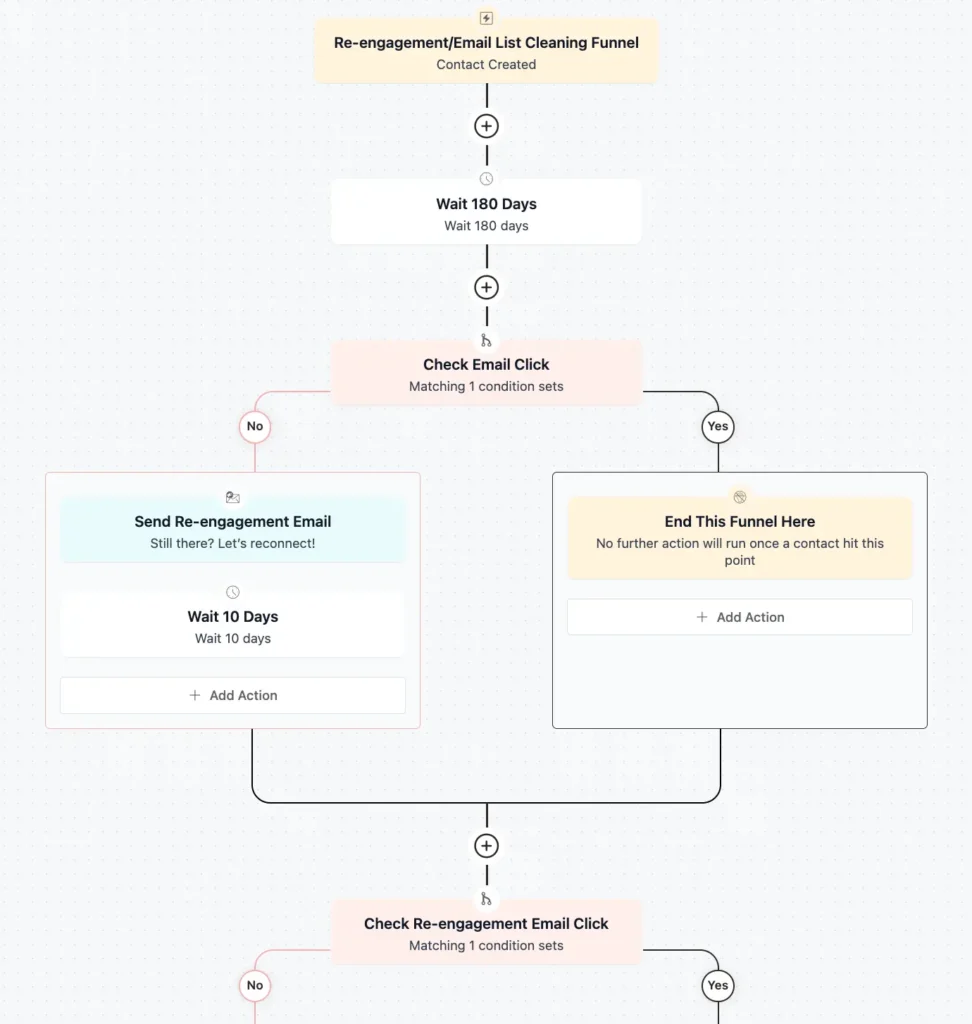
And in case you want to re-engage contacts before removing them entirely, FluentCRM offers a very simple built-in re-engagement automation funnel to get you started.
Easier to Protect Than Fix
Email sender reputation is one of the things that’s easier to protect than to fix when something goes wrong. It’s not complicated; all you need is discipline.
Track domain and IP trust, watch complaints and bounces, check blacklists weekly, and pay attention to engagement trends. If you do that consistently, you will be able to spot issues early and protect your email sender’s reputation.
And when you do that, you get a WordPress email system that stays reliable for all your marketing, automation, and customer communication emails!

Nazir Himel
“Produce value through quality content” – is the motto I live by. Content Marketing, SEO, and Email Marketing are my primary interests and if I’m not busy with any of them, you’ll probably find me roaming around the city.
Table of Content
Subscribe To Get
WordPress Guides, Tips, and Tutorials




Add your first comment to this post