

Hard Bounce vs. Soft Bounce: What Each Means for Your Sender Reputation?

Every email you send is a gamble.
You’re staking your message, your timing, and your sender reputation on the bet that it actually reaches an inbox, gets opened, and drives action.
Most of the time, the odds are in your favor. But sometimes email servers reject your emails before they’re even placed. That’s what we consider email bounces.
Knowing the difference between a hard bounce and a soft bounce matters. It affects how email providers see you as a sender, and whether your next emails reach the inbox at all.
This guide covers it all in plain terms, so keep reading until the end.
What is an Email Bounce?
An email bounce occurs when a message you send is rejected and never reaches the recipient’s inbox. The recipient’s mail server refuses it and sends it back, along with an automated Non-Delivery Report (NDR) explaining why.
One thing to know upfront: a bounce is not the same as landing in spam.
The difference: A spam-filtered email still arrives; however, it lands in the wrong folder.
In contrast, A bounced email never arrives at all. They’re different problems, and they need different fixes.
There are two types of bounces: soft bounces (temporary failures) and hard bounces (permanent failures). Each has its own causes and its own fix.
How is Email Bounce Rate Measured?
In simple terms, Email bounce rate is the percentage of emails you sent that didn’t get delivered.
Here’s the formula:
Bounce Rate = (Bounced Emails ÷ Total Emails Sent) × 100

So if you send 5,000 emails and 75 bounce, your bounce rate is 1.5%.
Email Bounce Types: Hard Bounce vs. Soft Bounce
Not all bounces are created equal. Knowing which type you’re dealing with tells you how urgently you need to act and what action to take.
Hard Bounce
A hard bounce is a permanent delivery failure. The email could not be delivered and, unlike a soft bounce, will never be deliverable to that address. Your ESP will not attempt to resend.
Think of a hard bounce as a “return to sender — address unknown” stamp. There’s no point trying again.
Hard bounces carry the heaviest weight on your sender reputation. ISPs and mailbox providers view frequent hard bounces as a clear sign that you’re managing a low-quality, unverified, or poorly maintained email list.
Even a handful of hard bounces within a large send can trigger red flags.
What Causes Hard Bounce?
Hard bounces are caused by permanent issues, almost always tied to the email address or its domain:
- Address doesn’t exist: The most common cause is a typo, such as [email protected] instead of [email protected].
- Deactivated mailbox: The address once existed, but the account has since been closed, deleted, or deactivated.
- Invalid domain: The entire domain is misspelled, expired, or has no mail exchange (MX) record set up. Sending to [email protected] instead of [email protected] will hard bounce.
- Permanent server block: The receiving mail server has permanently blocked your sending domain or IP address. This drastic action typically results from repeated spam complaints, authentication failures, or being added to a blocklist.
- Forwarded-mail mismatch: Less common, but a real edge case when a forwarded address routes to a server that ultimately rejects the message with a permanent error.
Note: Remove hard-bounced addresses from your list immediately.
Soft Bounce
A soft bounce is a temporary delivery failure. The email reached a valid address, but the receiving mail server rejected it for a non-permanent reason.
Your ESP will typically retry sending a soft-bounced message automatically, often over a 24–72 hour window, before marking the email as undelivered.
What Causes a Soft Bounce?
Soft bounces can occur for a variety of temporary reasons:
- Full mailbox: The recipient’s inbox is full. This is the most common cause
- Server down: The recipient’s mail server is temporarily under maintenance
- Email too large: Your email is bigger than what their server allows
- Sending too fast: You sent a burst of emails, and the receiving server slowed you down
- Spam filter: Something in your email triggered a spam filter on their end.
- DNS hiccup: A temporary issue resolving the recipient’s domain.
- Image-only email: Email contains no text, just images, and filters don’t like that
Note: Soft bounces become a serious problem if they persist. An address that soft-bounces repeatedly across multiple campaigns is a signal that something is fundamentally wrong.
How to Read Bounce Codes
When an email bounces, the receiving server sends back an SMTP response code. It’s a 3-digit number that classifies the type of failure. Understanding these codes helps you diagnose exactly what went wrong.
There are two groups:
4xx Codes: Temporary Failures (Soft Bounces)
These indicate a temporary problem. The server is essentially saying “not right now, try later.”
| Code | Meaning |
|---|---|
| 421 | Service temporarily unavailable; server is busy or down |
| 450 | Mailbox unavailable; try again later |
| 451 | Local error in processing; temporary server-side issue |
| 452 | Insufficient system storage; recipient’s server is out of space |
5xx Codes: Permanent Failures (Hard Bounces)
These indicate a definitive rejection. The server is saying “this address does not exist or cannot receive email.“
| Code | Meaning |
|---|---|
| 550 | Mailbox unavailable; non-existent or blocked address |
| 551 | User not local; address doesn’t exist at this server |
| 552 | Exceeded storage allocation; permanent quota issue |
| 553 | Mailbox name not allowed; invalid email format or address |
| 554 | Transaction failed; permanent general failure |
Quick Overview: Soft Bounce vs. Hard Bounce
Knowing which type of bounce you’re dealing with changes everything, so here is a side-by-side comparison of Hard Bounce vs. Soft Bounce:
| Attribute | Soft Bounce | Hard Bounce |
|---|---|---|
| Failure nature | Temporary | Permanent |
| Common causes | Full mailbox, server downtime, oversized email, spam filters, rate limiting | Invalid/non-existent address, deleted account, bad domain, permanent block |
| SMTP codes | 4xx (421, 450, 451, 452) | 5xx (550, 551, 552, 553, 554) |
| ESP retry behavior | Yes, typically retries for 24–72 hours | No, no retry attempted |
| Required action | Monitor; remove invalid email addresses if it persists | Remove from invalid emails immediately |
| Impact on reputation | Minor if occasional; serious if persistent | Immediate and severe |
The Consequences of Email Bounces on Your Sender Reputation
Your sender reputation is a score. It is maintained by ISPs, mailbox providers like Gmail and Outlook, and blocklist organizations.
The sender reputation determines how trustworthy you are as an email sender. A poor sender score means your emails get routed to spam or blocked outright before they can reach a recipient’s inbox.
How Hard Bounces Damage Your Reputation?
Hard bounces tell ISPs one clear thing: you’re sending to email addresses that don’t exist or shouldn’t receive mail.
That pattern is associated with:
- Purchased Email Lists: A practice that violates almost every ESP’s terms of service
- Poor List Hygiene: Not cleaning or verifying your email list before sending
- Spam-like Behavior: Spammers often blast emails to random or scraped addresses, resulting in high hard bounce rates
Even a small number of hard bounces in a high-volume send raises flags.
Exceeding a 2% hard bounce rate can trigger automated filtering at major providers, pushing all your future emails, regardless of valid or engaged contacts go into the spam folder. Some providers might also suspend your sending account entirely.
How Soft Bounces Damage Your Reputation?
Soft bounces, individually, are less damaging than hard bounces.
They happen to every sender occasionally, and ISPs understand that. The threat lies in patterns and persistence:
- Consistent soft bounces to the same addresses suggest those contacts are inactive or disengaged
- High overall soft bounce rates signal poor list management
- Repeatedly sending to persistently soft-bouncing addresses eventually has the same reputational effect as sending to invalid addresses
What ESPs Actually Look For?
Beyond bounce rates, ESPs evaluate your sender reputation based on several interconnected signals, and high bounce rates worsen most of these signals simultaneously.
Spam Complaint Rate
How often recipients mark your emails as spam?
Google and Yahoo now enforce a strict threshold of 0.1%. Cross it consistently, and your emails start getting filtered or blocked across the board, not just for the people who complained.
Engagement Rates
Email engagement metrics such as open rates, click rates, and replies play a huge part.
ISPs treat engagement as a vote of confidence. If people aren’t opening your emails, it signals your content isn’t wanted, and wanted mail gets priority delivery.
Sending Consistency
Sudden spikes in email sending volume look suspicious.
If you normally send 2,000 emails a week and suddenly blast 50,000, ISPs notice. Gradual, predictable sending builds trust; erratic behavior erodes it.
Email Authentication
Authenticating your email is pivotal.
The main three DNS records, SPF, DKIM, and DMARC, prove that you are who you say you are.
Failing authentication is a red flag that can cause outright rejection at the server level, before your content is even evaluated.
Blocklist Status
Whether your sending IP or domain appears on known spam blocklists like Spamhaus or Barracuda determines the status of your email deliverability rate.
Landing on a blocklist can cut your deliverability overnight, and getting removed often takes days or weeks of manual effort.
How to Track Bounces using FluentSMTP
FluentSMTP, as a free WordPress SMTP plugin, interacts with your email delivery infrastructure (FluentCRM) in ways that directly affect how bounces are handled and reported.
Here’s what you should cover:
Where FluentSMTP Stores Failed Email Data
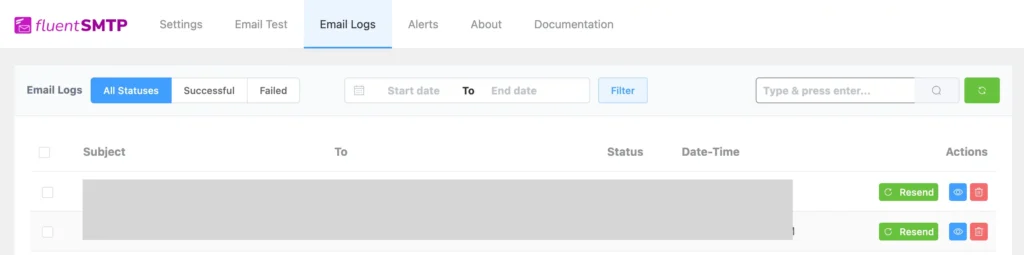
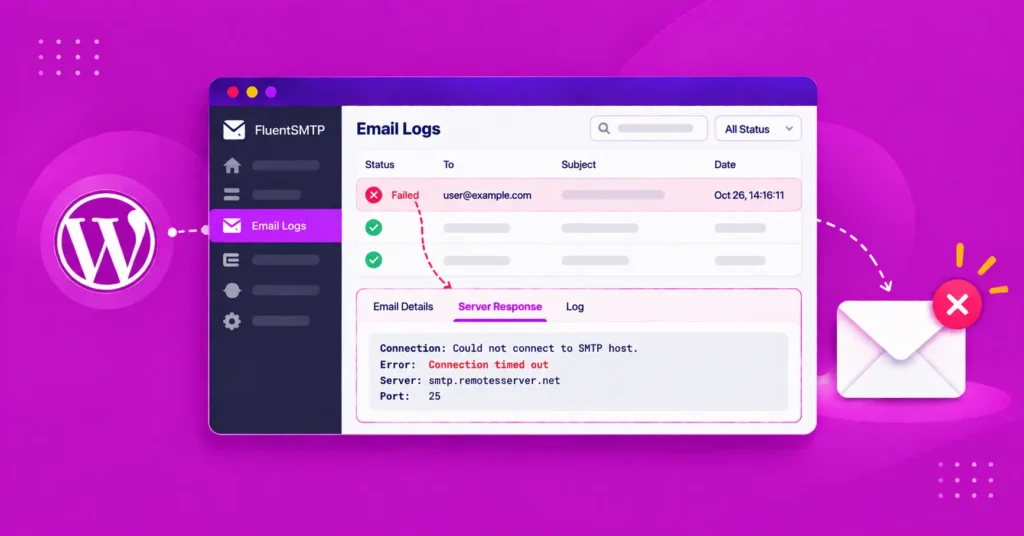
FluentSMTP logs every outgoing email in your WordPress database.
To access this, go to FluentSMTP → Email Logs from your WordPress dashboard. The log records every email with:
- Status: Whether the email was sent successfully or failed
- Recipient address and subject
- Timestamp of when it was sent
- Error message if delivery failed
You can filter logs by status (All, Successful, Failed), by date, or search for a specific address.
If an email shows as failed, you can resend with a single click using the Resend button.
Bounce Tracking and Notification
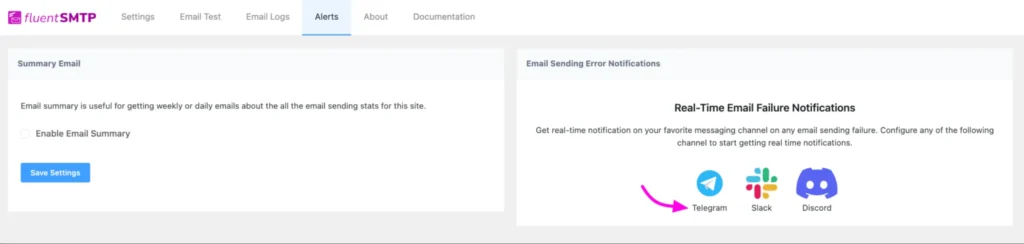
You can also set up Email Sending Error Notification on your Telegram. Every time an email fails to land, you will receive a notification.
To set it up, navigate to Alerts, select Telegram. Then click on the official Telegram bot to add the Telegram bot to your Telegram account.
How to Improve Email Bounces
If your bounce rate is already elevated, here is how to bring it down:
Audit Your Email List
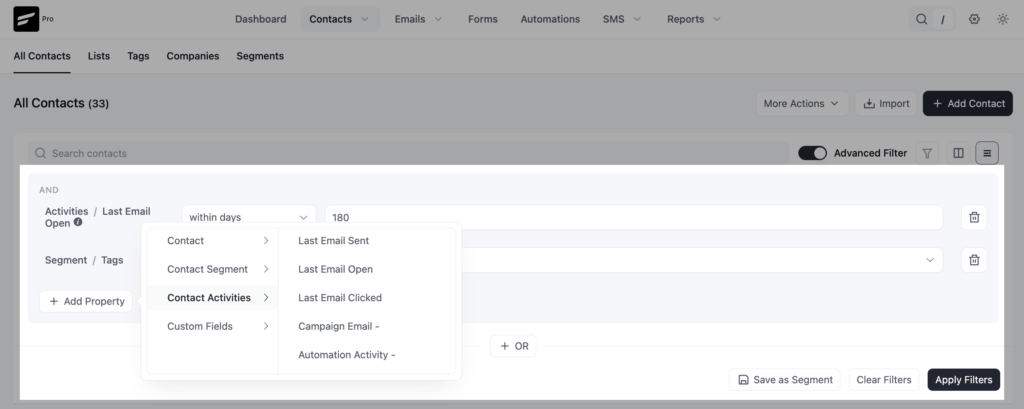
If you are managing contacts via customer relationship management software like FluentCRM, then go to your contacts list and filter contacts based on their engagement. Identify inactive contacts and put them under a dedicated list.
Also, check your email log to filter out failed emails and export your bounce data. Then follow these two steps:
- Hard-bounced addresses must come off the list today
- Soft-bounced addresses should be tagged and monitored across the next 2–3 sends before removal.
List Clean-up
Run your list through an email verification service. Tools like ZeroBounce can validate your entire list against live mail servers and flag invalid, risky, and disposable addresses before you send.
The list clean-up is especially important if your list is more than 6 months old or was imported from an outside source. And running it through a bulk email verifier makes this pass quickly even for large files, returning per-address status, role-based mailbox flags, and catch-all warnings so risky contacts can be segmented out before the next campaign.
Mark Down Soft Bounces
Identify and address persistent soft bounces. If the same address has soft-bounced across 3 or more campaigns, treat it as a hard bounce and remove it.
Repeated soft bounces to the same address indicate a structural problem.
Warm Up Before Bulk Sending
If you’ve recently migrated to a new SMTP provider, IP address, or sending domain, ISPs don’t recognize your reputation yet.
Start email warming up by sending small volumes to your most engaged subscribers, then gradually increase over several weeks.
Sending too much too fast leads to throttling and elevated soft bounce rates.
Review & Optimize Email Content
Emails that frequently trigger spam filters will produce soft bounces.
- Test your emails through a spam score checker before sending
- Avoid trigger words in subject lines, preview text, and email body
- Ensure you have a healthy text-to-image ratio
- Never send image-only emails
Authentication is a Must
Many soft bounces caused by security filter rejections happen because SPF, DKIM, or DMARC records are misconfigured.
Verify your authentication setup with a free tool like MXToolbox or mail-tester.com.
Run Re-engagement Campaigns
Subscribers who haven’t opened an email in 6–12 months are more likely to have full mailboxes, abandoned accounts, or simply disengaged inboxes.
Send a dedicated re-engagement email to this segment; remove anyone who doesn’t respond.
Ways to Prevent Bounces in the First Place
Prevention is always more effective than remediation. Hard bounces or soft bounces can be minimized by taking precautions before you start sending your campaigns.
Follow these practices to protect your list quality and bounce rate proactively:
- Turn on double opt-in, so subscribers confirm their email before being added to the list
- Add real-time email validation to your sign-up forms to block bad addresses
- Stop buying email lists; they’re full of invalid contacts that will drive up bounce rate
- Clean your list every 6 months to remove addresses that have gone inactive or invalid
- Remove subscribers who haven’t engaged in 12 months before they start bouncing
- Set up email authentication so receiving servers can verify your emails are legitimate
- Create automated alerts that notify you when emails get bounced
- Break large sends into batches spread over several hours to avoid getting rate-limited by Gmail or Outlook
- Remove role-based addresses like info@, admin@, and noreply@ from your marketing list
Remember, Your Sender Reputation Is as Good as Your List
Every bounce, soft or hard, is a signal. Ignore enough of them, and ISPs will start making decisions about your emails before your subscribers ever get the chance to.
The good news is that bounces are manageable. You don’t need a perfect list; you need a well-maintained one.
- Remove the dead weight
- Validate at the source
- Authenticate your domain
- Keep a close eye on your numbers
Do those things consistently, and your sender reputation will reflect it. A clean list isn’t just a nice-to-have thing; it’s what separates email that gets delivered from email that disappears.
Tanzil Ebad Efti
Words are my favorite playground. As a Creative Writer at WPManageNinja, I don’t just produce content; I tell stories. By mixing fiction and metaphors with real-life examples, I turn my writing into a creative journey that’s easy for readers to digest and relate to.
Table of Content
Subscribe To Get
WordPress Guides, Tips, and Tutorials




Add your first comment to this post