

Sender Score: What It Measures and How to Raise Yours


If your emails are landing in spam, getting ignored, or just underperforming, sender score is probably one of the first things you’ll come across.
It sounds more important than it is and less important than it seems.
The real value of sender score is not in the number itself, but in what it helps you understand about your email health.
Sender score is a useful signal, but it is not the final decision-maker.
What Is Sender Score?
Sender score is a reputation score for your email sending behavior, usually measured on a scale from 0 to 100.
It is designed to estimate how trustworthy your email activity looks based on data collected across a large network of inbox providers, spam filters, and security systems.
Think of it like a credit score for your email sending.
A high score suggests your sending behavior looks healthy, and a low score suggests there may be issues with your list, engagement, or sending practices.
But here’s the key point:
Sender score is not calculated by Gmail, Outlook, or Yahoo. It is created by third-party systems trying to approximate reputation, not define it.
How Sender Score Is Calculated
Sender score is not based on a single metric. It is built from multiple signals collected over time.
Most scoring systems use a rolling window (often around 30 days) and compare your behavior against other senders.
Here are the main signals that influence your score:
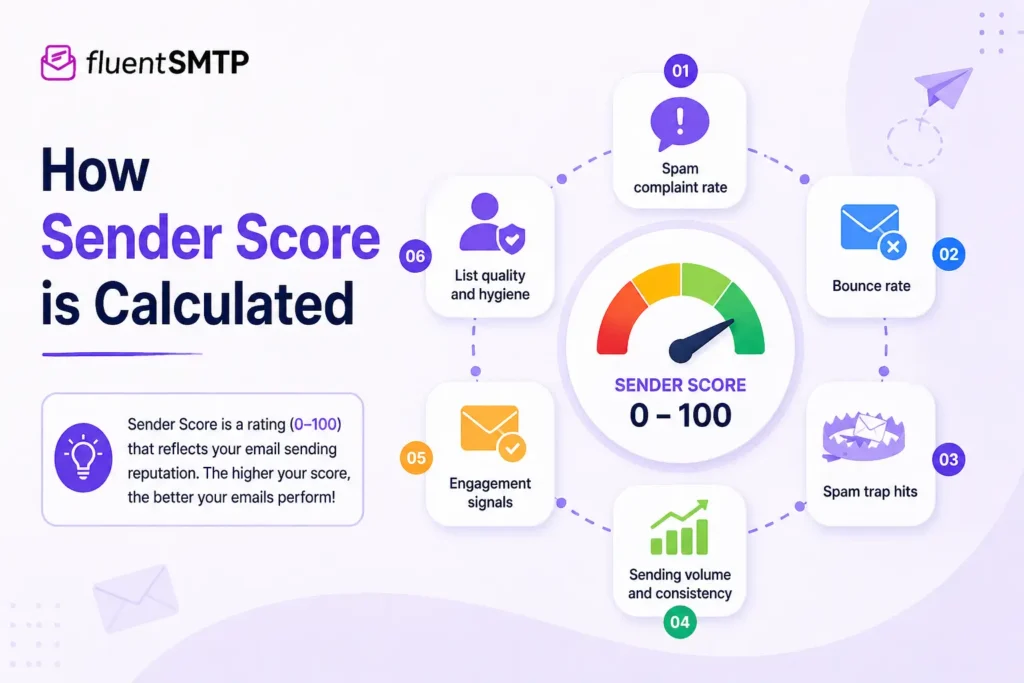
- Spam complaint rate
- Bounce rate (invalid or unknown users)
- Spam trap hits
- Sending volume and consistency
- Engagement signals (opens, clicks)
- List quality and hygiene
In simple terms, the score tries to answer one question:
Does this sender behave like someone people want to hear from, or someone the inbox should be cautious about?
Sender Score vs Sender Reputation
These two are closely related, but they are not the same.
Sender reputation is the actual judgment made by inbox providers. It is what determines whether your emails reach the inbox, spam folder, or get blocked.
Sender score, on the other hand, is an external estimate of that reputation.
A simple way to think about it:
- Sender reputation = real decision-making system
- Sender score = diagnostic indicator
This distinction matters.
You can have a good sender score and still struggle with deliverability if:
- Your content triggers filters
- Your authentication is weak
- A specific provider distrusts your domain
Sender score helps you spot problems, but it does not control inbox placement.
What Is a Good Sender Score?
Sender score typically ranges from 0 to 100.
Here’s how to interpret it:
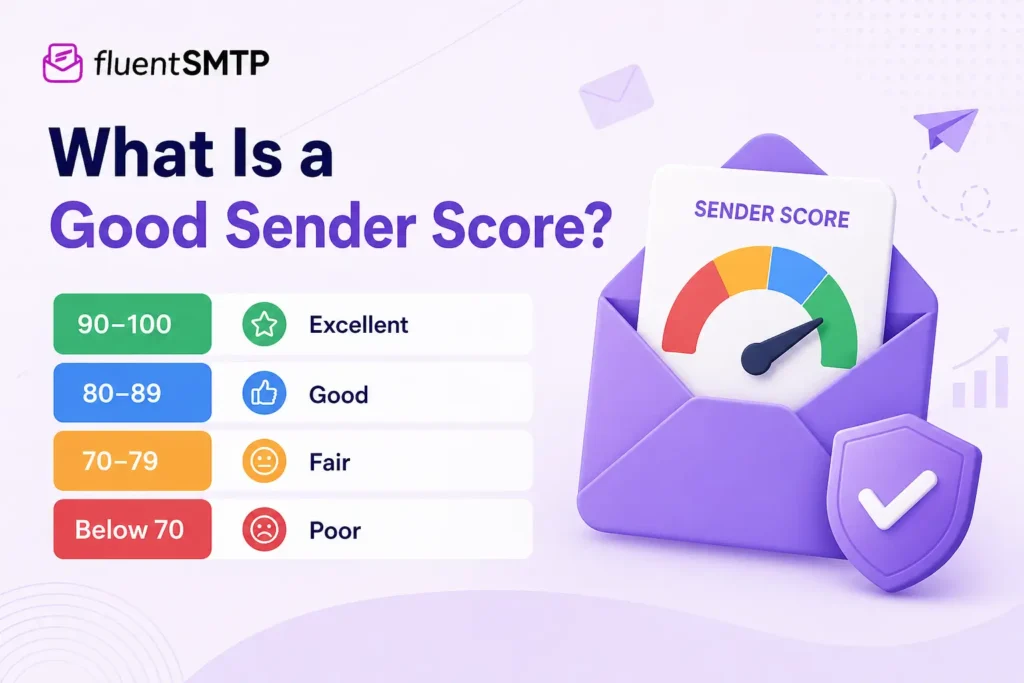
- 90–100 → Excellent: Your sending behavior looks highly trusted
- 80–89 → Good: Generally healthy, but watch for small issues
- 70–79 → Fair: Some risk signals present, needs improvement
- Below 70 → Poor: High risk of deliverability problems
If your score drops below 80, it is a sign that something in your email setup or behavior needs attention.
Why Sender Score Matters for Email Performance
Sender score matters because it helps you see problems early. A declining score often appears before major deliverability issues become obvious.
When your sender score drops, you may start noticing:
- More emails landing in spam
- Lower open and click rates
- Increased bounce rates
- More complaints from recipients
- Reduced inbox placement
So while sender score does not control deliverability directly, it reflects the same signals that inbox providers care about. That makes it a valuable early warning system.
Don’t forget to check these surefire deliverability tricks
What Affects Sender Score the Most
Sender score is shaped by a combination of behaviors, not just one factor.
- List Quality: A clean, permission-based list builds trust. Poor lists damage reputation quickly.
- Spam Complaints: Even small complaint rates send strong negative signals.
- Bounce Rates: High bounce rates suggest invalid or poorly maintained lists.
- Engagement: Low engagement weakens your reputation over time.
- Sending Behavior: Inconsistent or sudden spikes in sending can trigger suspicion.
- Spam Traps: Hitting traps indicates poor list acquisition practices and can severely damage your score.
Common Mistakes That Lower Sender Score
Most sender score problems come from avoidable mistakes. Here are some high-risk mistakes you need to avoid:
- Buying email lists
- Ignoring inactive subscribers
- Not removing bounced emails
- Sending to unsegmented audiences
- Overmailing disengaged users
- Sudden spikes in sending volume
These mistakes create long-term reputation damage rather than immediate failures.
How to Check Your Sender Score
The easiest way to check your sender score is through SenderScore.org, where you can look up your IP or domain.
But checking a score alone is not enough.
To get a complete picture, you should also use:
- Google Postmaster Tools (for Gmail reputation and spam rate)
- Microsoft SNDS (for Outlook-related data)
- Your email platform analytics (for engagement, bounces, and complaints)
When you combine these sources, you move from guessing to understanding.
How to Improve Your Sender Score (Step by Step)
Improving your sender score is not about fixing one number. It is about improving the signals behind that number. If your list quality is poor, complaints are rising, or engagement is dropping, your score will reflect that over time.
The goal is simple: show inbox providers that you send wanted, relevant, and safe emails to real people who expect to hear from you. If you are new to email marketing, then you should follow the following steps regularly:
Clean Your Email List Regularly
Start with your list because most sender score problems begin there. If you keep sending to invalid, outdated, or inactive addresses, your bounce rate increases and your engagement drops.
Remove hard bounces immediately. These are email addresses that cannot receive your messages anymore. Keeping them on your list makes your sending behavior look careless.
You should also remove or suppress contacts who have not engaged for a long time. A smaller list with active subscribers is much better than a large list full of people who never open your emails.
Stop Sending to Cold or Purchased Contacts
Purchased, scraped, or rented email lists can damage your sender score quickly. These contacts did not ask to hear from you, so they are more likely to ignore your emails, unsubscribe, or mark them as spam.
They may also include spam traps, which are email addresses used to identify poor sending practices. Hitting spam traps can severely hurt your reputation.
Only send emails to people who clearly opted in. This keeps your list healthier and improves the chances of positive engagement.
Send to Engaged Subscribers First
If your sender score is low or declining, do not email your entire list at once. Start with the people who are most likely to engage.
These may include subscribers who recently:
- Opened your emails
- Clicked a link
- Replied to a message
- Purchased something
- Submitted a form
- Booked a call or appointment
Positive engagement from active users helps rebuild trust. Once your performance stabilizes, you can gradually expand to less active segments.
Keep Your Bounce Rate Low
A high bounce rate is one of the clearest signs of poor list hygiene. If too many emails fail to deliver, it tells reputation systems that your list is not well-maintained.
To reduce bounces, clean your list before major campaigns. Use verified signup forms, avoid importing old contacts without checking them, and remove addresses that repeatedly fail.
Also, review where bad contacts are coming from. If one form, lead magnet, or import source creates many invalid addresses, fix that source first.
Reduce Spam Complaints
Spam complaints are one of the strongest negative signals for sender score. Even a small number can hurt if your list size is small or your engagement is already weak.
The best way to reduce complaints is to send emails people actually expect. Your subject line, content, and frequency should match what users signed up for.
Make sure your unsubscribe link is easy to find. It may feel risky, but it is much better for someone to unsubscribe than mark your email as spam.
Here’s a quick fix if your emails are going to spam
Improve Email Relevance with Segmentation
Sending the same message to everyone often leads to weak engagement. Not every subscriber has the same interest, need, or stage in the customer journey.
Segment your list based on:
- Signup source
- Recent activity
- Product interest
- Purchase history
- Location
- Engagement level
- Customer lifecycle stage
When your emails feel more relevant, people are more likely to open, click, and interact. That positive engagement supports a healthier sender score.
Maintain a Consistent Sending Pattern
Reputation systems prefer stable sending behavior. If you send nothing for weeks and then suddenly send a large campaign, that spike can look suspicious.
Create a consistent sending schedule that your audience can expect. This could be weekly, biweekly, or based on your campaign needs. The key is to avoid sudden volume jumps.
If you need to increase volume, do it gradually. Start with your most engaged users, then slowly include larger segments.
Warm Up New Domains or IPs Slowly
If you are using a new sending domain, IP, or email service, do not start with your full list immediately. New senders do not have enough trust history yet.
Begin with a small volume and send to your most engaged contacts first. If they open and click, your sending signals look healthier.
Then increase volume step by step. This helps inbox providers recognize your sending pattern as normal and trustworthy.
Improve Engagement Before Increasing Volume
When email performance drops, many senders try to send more emails. That usually makes the problem worse.
Before increasing volume, improve the quality of your campaigns. Make your subject lines clearer, your opening lines stronger, and your content more useful.
Ask yourself:
- Is this email useful to the reader?
- Is the subject line honest?
- Is the offer relevant?
- Is the CTA clear?
- Am I sending this to the right segment?
Better engagement is one of the strongest ways to improve sender score over time.
Monitor Campaign Metrics After Every Send
Do not check sender score only once in a while and ignore campaign-level data. Your email metrics show what is happening in real time.
After each campaign, review:
- Bounce rate
- Spam complaint rate
- Open rate
- Click rate
- Unsubscribe rate
- Inbox placement
- Delivery errors
Look for patterns. If complaints rise after a specific campaign, review the audience and message. If bounces increase after importing a new list, clean that source.
Fix Authentication and Sending Setup
Sender score is mostly tied to reputation signals, but your technical setup still matters. If email authentication isn’t set up properly, inbox providers may trust your emails less.
Make sure your domain has the basics configured:
- SPF
- DKIM
- DMARC
You do not need to turn this section into a technical tutorial, but these records help prove that your emails are really coming from your domain.
Setting up and managing authentication manually can be confusing, especially if you are not technical. Using a reliable SMTP tool like FluentSMTP can simplify this process by helping you connect your email service properly and ensure your emails are sent through trusted channels.
Download FluentSMTP
(100% Free)
Get the most powerful SMTP plugin for free and hit the recipient’s inbox with your WordPress emails

Remove or Re-Engage Inactive Subscribers
Inactive subscribers are not always bad, but they become a problem when you keep sending to them forever.
Before removing them, you can try a re-engagement campaign. Ask if they still want to hear from you, offer useful content, or let them update their preferences.
If they still do not respond, suppress them from regular campaigns. This helps protect your engagement rate and keeps your list healthier.
Avoid Spammy or Misleading Content
Your content also affects how people react to your emails. If your message feels misleading, overly aggressive, or irrelevant, people may ignore it or complain.
Avoid subject lines that promise something the email does not deliver. Do not use fake urgency too often. Keep your message clear, useful, and aligned with the reader’s expectations.
A simple, honest email often performs better than a clever but confusing one.
Track Sender Score Alongside Real Deliverability Data
Sender score is helpful, but do not treat it as your only source of truth. A good score does not guarantee inbox placement, and a low score does not explain every issue by itself.
Use sender score together with:
- Google Postmaster Tools
- Microsoft SNDS
- ESP reports
- Inbox placement tests
- Bounce and complaint reports
This gives you a fuller picture of your email health and helps you make smarter decisions.
Build a Long-Term Reputation Habit
Improving sender score takes time. You may not see a big jump overnight, especially if your reputation has been damaged for a while.
The best approach is to build healthy sending habits:
- Send to people who gave permission
- Keep your list clean
- Watch complaints and bounces
- Send relevant emails
- Keep a steady sending pattern
- Monitor your data regularly
When these habits become part of your email process, your sender score becomes easier to maintain. More importantly, your overall deliverability gets stronger too.
Limitations of Sender Score
Sender Score is helpful, but it has limitations.
First, inbox providers do not use it directly. Gmail, Outlook, and Yahoo rely on their own internal systems.
Second, it does not reflect everything. It cannot fully measure content quality, user intent, or provider-specific filtering.
Third, it is a generalized score. Your reputation may differ across providers even if your Sender Score looks good. That is why Sender Score should be used as a guide, not a goal.
Does Sender Score Still Matter in 2026?
Yes, but in a different way.
Today, inbox providers focus more on:
- Authentication (SPF, DKIM, DMARC)
- Spam complaint rates
- Engagement signals
- Consistent sending behavior
Sender score does not replace these. It reflects them.
So while it is still useful, it should not be your main focus.
The real goal is to follow good sending practices. If you do that, your sender score will improve naturally.
Read this article to know more about SPF, DKIM, and DMARC
Tools That Help You Monitor Deliverability
To manage your Sender Score effectively, you need visibility. Useful tools include:
- SenderScore.org → Quick score check
- Google Postmaster Tools → Gmail data
- Microsoft SNDS → Outlook insights
- ESP dashboard → Campaign performance
- Inbox testing tools → Placement tracking
Using these together gives you a much clearer picture than relying on a single number.
Final Takeaway
Sender score is a signal, not a verdict.
If it drops, it usually points to issues with list quality, engagement, complaints, or sending behavior. If it is high, it simply means your fundamentals are strong.
The real focus should always be on building trust.
Keep your list clean, send to people who want your emails, monitor your metrics, and stay consistent.
If you do that, your sender score and your email performance will improve over time.

Aminul Islam
Hi! Nice to meet you. I’m a guy who loves to explore, learn, and share knowledge. I spend most of my time catching up with marketing tips & tricks. When I’m not busy with any of these, you’ll find me with a book, exploring the city, or playing my favorite games.
Table of Content
Subscribe To Get
WordPress Guides, Tips, and Tutorials



Leave a Reply