

How to Sell WordPress Plugins and Scale Sustainably (Real Insights from WPManageNinja Journey)


WordPress powers 43% of the internet.
That’s millions of websites. Billions of users. And thousands of developers built something that actually solves a problem.
You did it too. You made something incredible that people actually use.
But then comes the fun part (kidding, it’s not fun): how do I actually sell this plugin?
So now your brain’s flooded with questions about how sales even work.
Well, selling isn’t like coding. There’s no syntax to follow.
But here’s the thing. It’s not some mystery either.
There’s a clear path. Strategic steps. Real systems that work.
And in this guide, we’re walking you through exactly that.
Plus, we’re sharing real insights from WPManageNinja’s journey. From launching one plugin to powering tools used on over 1.4 million websites.
So if you’re ready to turn your plugin into a real business, let’s begin.
Why Most WordPress Plugins Struggle to Make Money
Before we dive into selling strategies, we need to address the elephant in the room.
Why do most plugins struggle or never make a single dollar?
Because understanding this shifts how you position, price, and sell your plugin. Once you see what actually drives user buying decisions, everything else clicks into place.
So let’s get real for a second.
Right now, there are over 60,000 plugins sitting in the WordPress repository. Forms, SEO, security, and eCommerce, and if you pick any, you’ll find dozens of options already solving that problem.
And here’s where most developers trip up.
Most focus on what makes their plugin technically superior: better features, more options, cleaner code, and faster performance.
And those things matter. They absolutely do.
But here’s what shifts the needle when it comes to actual sales: trust beats specs every single time.
Let’s just paint you a picture.
Imagine walking into a store to buy a vacuum cleaner. You walk into a store. Twenty options. They all clean floors. Some have more attachments, some are cheaper, and some look fancier.
You may pick the one that is lighter to carry. Fits under your couch. The one your friend swears by and works without adding stress to your Saturday morning.
Well, that’s what comfort looks like, and it’s what actually sells.
Same with plugins.
When someone lands on your product page, they’re not just comparing features. They’re asking:
- Will this actually solve my problem?
- Will it work without creating ten new headaches?
- Does it feel intuitive from the first click?
This is exactly what you need to show when you sell: trust signals, clear positioning, and proof that your plugin just works.
Because you’re not selling code. You’re selling confidence.
Where Should You Sell Your WordPress Plugin?
Alright, now comes the decision.
Where do you actually sell it?
But hold on. Before we get into that, let’s clear up something important.
WordPress is open-source. Free. And thousands of plugins on WordPress.org are free too.
So why would anyone pay for yours?
Well, here’s the model that works: freemium.
You release a free version that genuinely solves a problem. Not a demo. Not a teaser. A real solution people can use without paying.
Then your premium version adds the advanced stuff. More features. Automation. Integrations. Priority support.
The free version builds trust. The premium version builds revenue.
Simple, right?
Now, let’s talk about where you sell that premium version.
You’ve got two main options: marketplaces or your own website.
Both work. Both have trade-offs. And honestly? Most successful plugin businesses use both at different stages.
So let’s break them down.
Selling on a marketplace
Marketplaces like CodeCanyon, Codester, or Mojo Marketplace give you one thing most new plugins desperately need: traffic.
Thousands of people browse these platforms daily looking for solutions. Your plugin shows up in search. People find it. Some buy it.
No audience building. No ads. No waiting months for Google to rank your site.
Plus, marketplaces handle the boring stuff for you:
- Payment processing
- File hosting
- Download delivery
- Refund management
So you can focus on coding instead of running a store.
Sounds perfect, right?
Well, not exactly.
Here’s the reality check.
Marketplaces take a massive cut. CodeCanyon, for example, keeps 50% of every sale. So if someone buys your $100 plugin, you get $50.
Besides, you don’t control pricing. The marketplace often decides what your plugin should cost.
And here’s the bigger problem: you’re not building your brand.
You’re building theirs.
Users don’t remember your name. They remember, “I bought this on CodeCanyon.”
So while marketplaces are great for launching fast, they’re not a long-term growth strategy.
Pro Tip: If you’re just starting out, use a marketplace to get quick validation, build reviews, and generate some early sales. Then transition to your own site as you grow.
Selling from your own website
This is where real business-building happens.
When you sell from your own site, you keep 100% of the revenue. No cuts. You set your own prices. You control your messaging. You own the customer relationship.
Plus, you collect emails. You can upsell. You can build loyalty. You can create bundles, discounts, affiliate programs, whatever grows your business.
But here’s what you need to handle yourself:
Payment processing – Connect Stripe, PayPal, or another gateway to accept payments.
License management – Generate keys, validate activations, prevent sharing.
Automatic updates – Customers expect one-click updates from their WordPress dashboard.
Download delivery – Files need to be delivered instantly after purchase.
Marketing – No one’s going to stumble onto your site. You need to drive traffic.
Now, all of that might sound overwhelming.
But here’s the good news.
You don’t have to build any of this from scratch.
There are systems built specifically for selling WordPress plugins. They handle payments, licensing, delivery, and renewals automatically.
So you can focus on what you’re actually good at: building better plugins.
Heads Up: Most successful plugin businesses eventually move to their own sites. Why? Because owning your customers is worth way more long-term than the convenience of a marketplace.
So which one should you choose?
Here’s the honest answer: it depends on where you are right now.
Start with a marketplace if:
- You’re launching your first plugin
- You need quick validation and reviews
- You don’t have time to build marketing systems yet
Move to your own site when:
- You’re ready to scale
- You want full control over pricing and branding.
- You’re serious about building a sustainable business
And remember, this isn’t either/or. You can do both. Use the marketplace for exposure. Use your site for revenue and control.
How to Sell Your WordPress Plugin (Step-by-Step)
So you’ve chosen to build your own storefront. Good call.
Now let’s walk through exactly how to set everything up so you can start accepting payments, delivering licenses, and turning your plugin into a real business.
Note: We’re using FluentCart for this guide because it’s built for digital and physical products on WordPress. Lightning fast, handles payments, license keys, automatic updates, and download delivery – everything a plugin seller needs.
Let’s get into it.
Step 1: Install and set up FluentCart
Now you need the machinery behind the scenes. The checkout. The delivery system. The license validation.
This is where you build the engine before you hit the gas.
Here’s what you’ll set up:
Install FluentCart
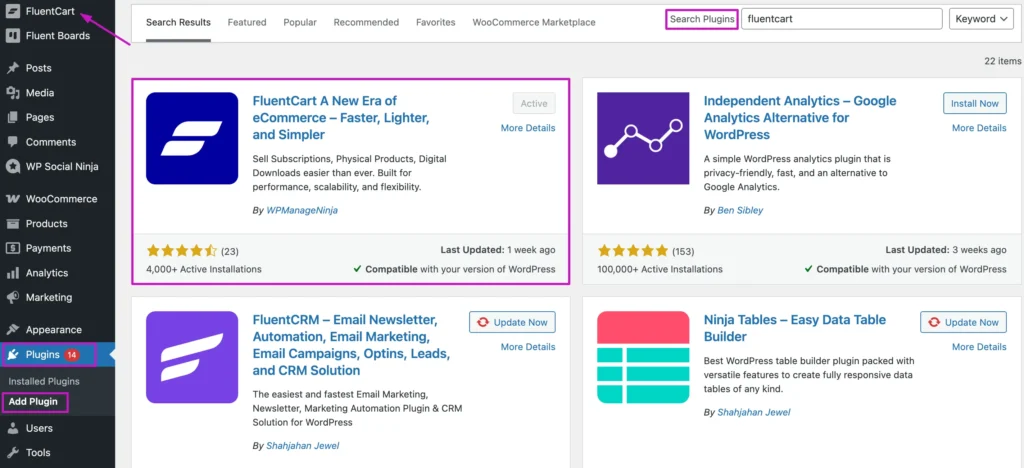
Go to Plugins > Add New, search for “FluentCart”, install, and activate.
Once activated, FluentCart walks you through a quick 3-step setup wizard:
- Store Details: Your shop name, country, currency, and logo
- Pages: Choose existing pages, auto-create them, or let AI generate them
- Template: Start from scratch or pick a pre-made design
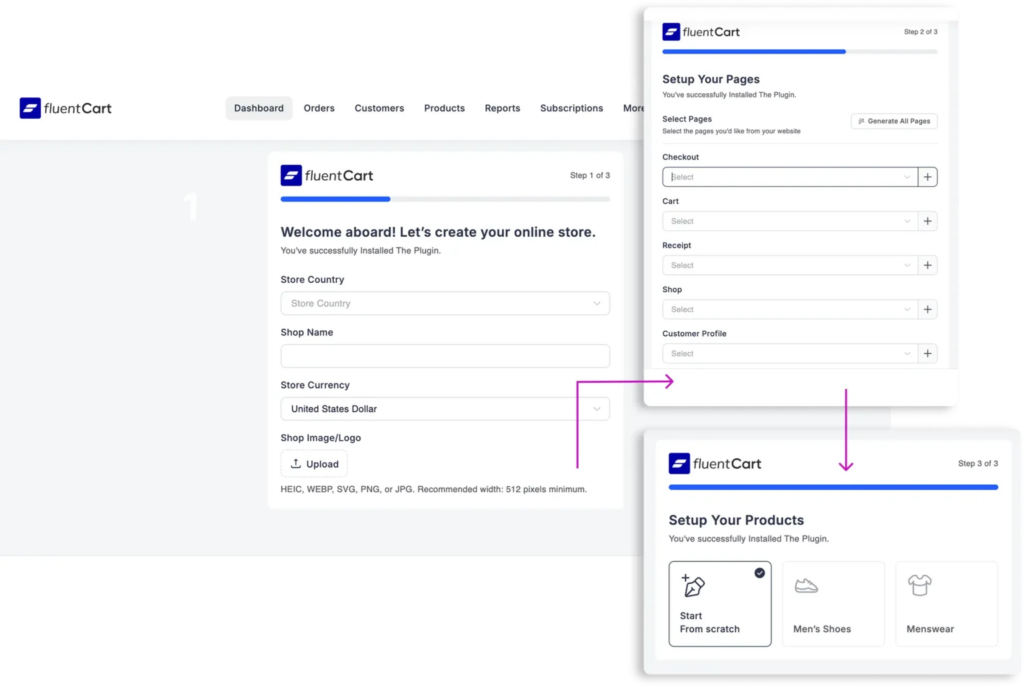
Click Save, and your store is ready.
Step 2: Create your product
Now Head to FluentCart > Products > Add New.
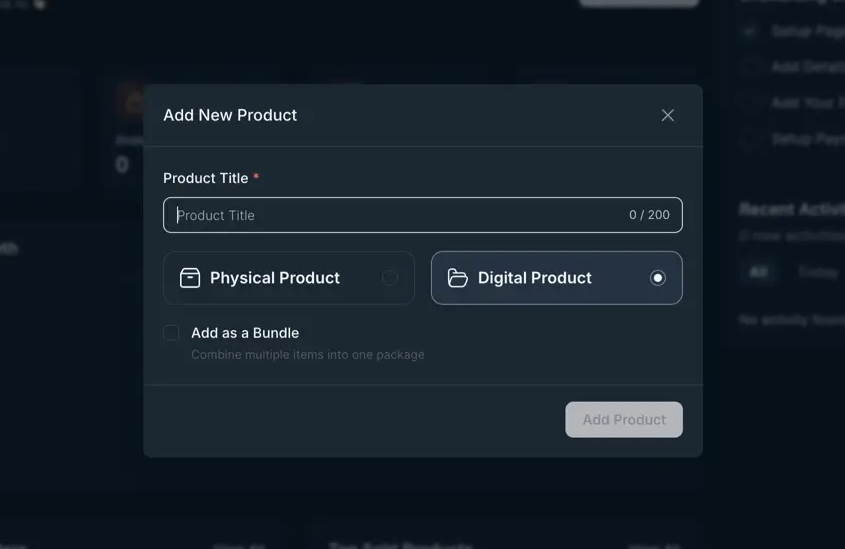
Here’s what you’ll fill in:
- Product title (clear, benefit-focused)
- Short description
- Full description
- Product images
- Upload your plugin ZIP
From there, FluentCart handles secure file delivery automatically, so customers get instant download access the moment they complete their purchase.
Step 3: Set up your pricing strategy
Okay, pricing time. This part’s more psychology than math.
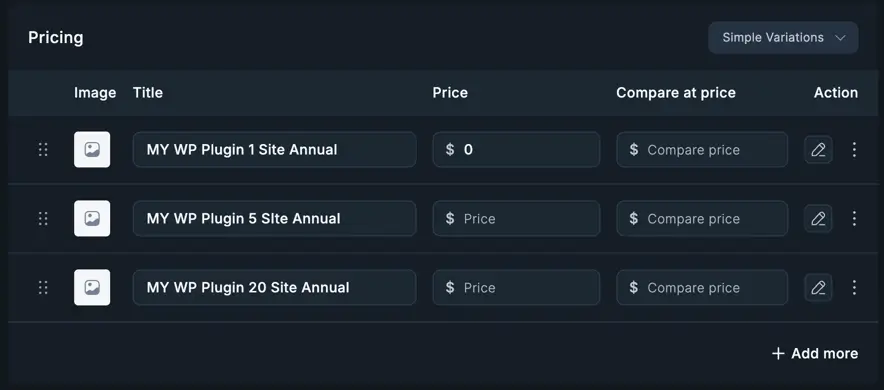
Here’s why: different customers have different budgets and different needs, so give them options that match.
Most successful plugins use tiered pricing:
| Tier | Sites | Price Range | Who Buys |
| Personal | 1 site | $49-79/year | Freelancers, hobbyists |
| Professional | 5 sites | $99-149/year | Small agencies, multi-project devs |
| Agency | Unlimited | $199-299/year | Agencies, power users |
Why three tiers work: Most people pick the middle option. The low-tier anchors “affordable.” The high tier makes the middle look reasonable.
Annual vs. Lifetime:
- Annual = recurring revenue, predictable income
- Lifetime = higher upfront, no ongoing revenue
Offering both lets customers self-select. Some want the lower annual cost. Others want “pay once, done forever.”
And FluentCart makes creating these tiers dead simple. Add variations with different license limits and features.
Step 4: Set up license management
This is the gatekeeper. Without proper licensing, you’re leaving money on the table and headaches on your plate.
Licensing lets you:
- Deliver automatic updates
- Enforce site limits
- Validate who’s actually paid
- Provide premium support to real customers only
FluentCart includes a licensing SDK. You integrate it into your plugin:
What it handles automatically:
$instance = new \YourPluginNameSpace\FluentLicensing();
$instance->register([
    'version'  => '1.0.0',
    'item_id'  => 'your_product_id',
    'basename' => plugin_basename(__FILE__),
    'api_url'  => 'https://your-store.com/'
]);- License key generation
- Activation validation
- Deactivation when needed
- Automatic update delivery through WordPress’s native system
And the best part?
It connects with WordPress’s built-in update system, so customers get one-click updates just like any other plugin. No custom update logic needed on your end.
Step 5: Connect your payment gateway
Time to open the cash register.
FluentCart integrates with the payment processors that matter:
Stripe – Best for credit cards, Apple Pay, and Google Pay. Fees: 2.9% + $0.30 per transaction.
PayPal – Essential for international customers who don’t use credit cards. Similar fee structure.
Connect your account in FluentCart > Settings > Payment Gateways.
Test everything in sandbox mode first. Then flip the switch to live.
One critical requirement: Make sure your entire site runs on HTTPS. Payment processors require it, and customers expect it. No HTTPS = no trust.
Step 6: Automate your email notifications
Here’s where the customer experience either shines or falls flat.
Set up these automatic emails:
Purchase confirmation:
- Order receipt
- License key (make it prominent)
- Download link
- Documentation link
- Activation instructions
- Support contact
License events:
- Activation confirmation
- Deactivation notice
Updates:
- New version available
- Security patches (send these immediately)
Renewals:
- 30 days before expiration
- 7 days before
- 1 day before
- Expired (with renewal link)
Day 7 check-in: “How’s everything going?” Ask if they need help. This single email catches problems early and builds a relationship.
After you configure the templates, FluentCart sends these automatically. You just customize the messaging to match your brand voice.
Step 7: Build your sales page
This is your digital storefront. The page that turns browsers into buyers.
Your sales page needs these elements:
Clear headline – What problem does your plugin solve in one sentence?
Visual proof – Screenshots, demo video, or live demo link where they can test-drive it.
Pricing tiers – Make the middle option the most attractive. That’s where most sales happen.
Trust signals – Testimonials, active user count, star ratings, case studies.
Guarantee – 30-day money-back removes the risk from their decision.
FAQ – Answer objections before they become deal-breakers.
The goal here is clarity, not complexity. Guide them to one clear decision: which tier fits their needs?
Step 8: Test the entire journey before launch
Before you announce anything to the world, walk through the complete customer experience yourself:
- Add your plugin to cart
- Complete checkout
- Confirm payment processes correctly
- Check that the license key arrives via email
- Verify the download link works
- Test license activation on a real site
- Trigger an update check to ensure it pulls from your server
Then, fix anything that feels clunky, broken, or confusing.
Your first customers will judge your entire business based on this experience. Make it smooth.
Need more details on the setup? Read the full guide on selling digital products online
That’s the foundation built.
You’ve got a storefront. A pricing strategy that works. Licensing that protects your revenue. And a system that runs on autopilot.
Grow Your WordPress Plugin Business (And Keep It Sustainable)
You’ve got your first sales. Customers are using your plugin. Revenue is coming in.
But running a plugin as a business brings recurring responsibilities.
What worked to get your first 100 customers won’t get you to 1,000. And what got you to 1,000 won’t carry you to 10,000.
Growth exposes the cracks, so let’s tackle them head-on.
Publish helpful content: Write tutorials, comparison guides, and solution-focused blog posts. Answer the questions your target users are searching for. SEO compounds over time.
Launch a free version on WordPress.org: High ratings and active installations build trust faster than any sales page. Plus, you get free distribution.
Automate your lead nurturing: Capture leads through demos, lead magnets, or newsletter signups. Then use email automation to deliver helpful sequences that educate users and guide them toward upgrading when they’re ready.
Fix email deliverability: If your license keys and renewal reminders end up in spam, you’re losing revenue. Connect your site to reliable SMTP services so every transactional email reaches the inbox.
Get the most powerful SMTP plugin for free and hit the recipient’s inbox with your WordPress emails

Build clean signup and lead capture forms: Make it easy for prospects to subscribe, request demos, or download resources. Forms should integrate with your email system so leads flow automatically into your nurture sequences.
Set up proper support systems: As you grow, support tickets multiply. Use a ticketing system with canned responses and a knowledge base so you’re not answering the same questions fifty times.
Turn happy customers into promoters: When users love your plugin, give them a reason to share it. Create an affiliate program that rewards referrals with commissions, so satisfied customers can actively help grow your sales.
Build a community around your product: Give people a place to ask questions, share solutions, and help each other. Whether it’s a forum, Facebook group, or dedicated community platform, it reduces your support load and builds stronger connections.
For the complete growth strategy, read: How to grow your business
The WPManageNinja Story: From One Plugin to an Ecosystem
Now you’re probably thinking, “Okay, but does this really work? Or are you just selling me a dream?”
Fair question. Let’s look at how WPManageNinja answered it.
A team of problem-solvers
Picture this. A small team is fueled by coffee and obsessed with one question: “What’s missing from WordPress?”
Not missing features. Not missing options. Missing solutions.
That’s how WPManageNinja started. Back in 2016, Shahjahan Jewel, a developer who’d spent years building WordPress sites for banks, nonprofits, and small businesses, saw a pattern.
People didn’t need more plugins. They needed better ones.
Ones that actually worked. Without crashes. Without bloat. Without requiring ten other plugins just to function.
So the team made a promise: solve one problem at a time. No fluff. No feature creep. Just clean, fast, useful tools that small businesses could actually afford.
The first product launch
Three years of planning. Market research. Failed prototypes. Then in 2018, they launched Ninja Tables.
A table builder. Simple. Lightweight. Fast.
It wasn’t revolutionary. But it worked beautifully. And people noticed.
Then came Fluent Forms.
Here’s where things get interesting. Most developers would’ve analyzed the market and walked away. Forms? One of the most crowded plugin categories in WordPress?
But WPManageNinja didn’t build Fluent Forms to compete on features. They built it to compete on experience.
Faster. Cleaner. More intuitive.
And the result?
Fluent Forms crossed 100,000 active installations in 42 months. The next 100,000? Just 10 months.
Today, it powers over 600,000 websites and won Gold at The WP Awards 2025.
The ecosystem strategy: solving sequential problems
Here’s where most plugin businesses miss the mark.
They build one product, maybe two, then try to maximize revenue by adding features until the plugin becomes a Swiss Army knife nobody knows how to use.
WPManageNinja went a different route.
They asked: “What’s the next problem our users face?”
Someone using Fluent Forms to collect leads inevitably needs email marketing. So they built FluentCRM- a self-hosted, affordable alternative in the market.
FluentCRM now serves 70,000+ businesses.
And the journey never stopped. One by one, products kept coming:
Ninja Tables → Fluent Forms → AzonPress → FluentCRM → WP Social Ninja → FluentSMTP → Fluent Support → Paymattic → FluentBooking → FluentBoards → FluentCommunity → FluentAffiliate → FluentCart

This wasn’t random product launches. It was solving sequential business problems and creating an ecosystem where each tool works together seamlessly.
Three core principles that built a 1.4M+ website empire
So what actually drove WPManageNinja’s success? Three things.
1. Speed without compromise
Every plugin WPManageNinja builds is obsessed with performance.
FluentCRM sends marketing emails with zero impact on website speed—even on a VPS server. Most email marketing plugins slow WordPress to a crawl.
FluentCart is built on a custom database schema specifically for e-commerce. No legacy baggage. No bloated queries. Just fast, indexed tables.
Their philosophy? If it’s not lightning-fast, it’s not ready.
2. Scalability by design
WPManageNinja products don’t just work for 100 users. They work for 100,000.
Fluent Forms handles complex multi-step forms with conditional logic without breaking. FluentCRM manages massive contact lists without performance degradation.
This isn’t random growth. It’s architecture. They built for scale from day one, not as an afterthought.
3. Affordability without sacrificing quality
Here’s the pricing philosophy that changed everything.
WPManageNinja saw small businesses getting crushed by SaaS subscription costs. Monthly fees are stacking up until you’re spending thousands per year on tools.
So they flipped the model.
Self-hosted solutions at a fraction of what competitors charge. One-time payment options. No ongoing SaaS lock-in.
The result?
Businesses that couldn’t afford enterprise tools suddenly had access to enterprise-quality solutions.
And of course, they kept iterating.
The numbers don’t lie
Today, WPManageNinja’s ecosystem powers 1.4 million+ active websites across 190+ countries.
The team grew from 4 people to over 110 employees.
What does this mean for you?
WPManageNinja didn’t win by having the biggest marketing budget. They didn’t win by launching first.
They won by:
- Building fast, lightweight solutions that actually solved problems
- Pricing affordably so small businesses could access quality tools
- Creating an ecosystem that solves sequential problems instead of random features
- Listening obsessively to user feedback and iterating constantly
- Staying committed to the WordPress community (sponsoring WordCamps, contributing to core)
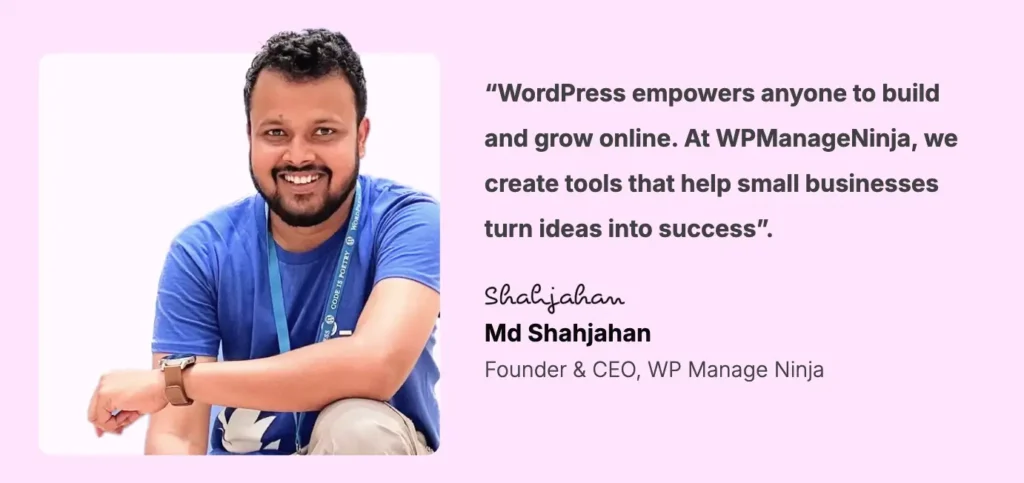
You don’t need a massive team. You don’t need venture capital. You need a real solution, fair pricing, and the patience to build something that lasts.
As Shahjahan Jewel, CEO of WPManageNinja, puts it:
Ready to Sell Your WordPress Plugin?
You’ve seen the roadmap. You know where to sell, how to price, what tools you need, and how to set everything up.
WPManageNinja proved this works. They started with one plugin and the same question you’re asking right now: can I actually turn this into a business?
They did. And so can you.
Set up the storefront. Automate licensing. Price fairly. Make the customer experience smooth from checkout to support.
You don’t need a big team. You need a solution people actually want, systems that run themselves, and the willingness to improve based on feedback.
Solve real problems. Keep iterating. Stay patient.
That’s how plugin businesses grow.
Now go build yours.

Mahjabin Sheikh
Hey, good people! I’m Mahjabin, a Digital Marketer at WPManageNinja. Just like the quote from Before Night Falls – ‘I write, and I survive’ – that’s me in a nutshell! With coffee in hand, I dive headfirst into WordPress and Project Management. When I’m off the clock? You’ll find me writing about movies, breaking down series moments, and, of course, scrolling through memes for a good laugh!
Table of Content
Subscribe To Get
WordPress Guides, Tips, and Tutorials


Leave a Reply